SSL/TLS Configuration
Overview
Enov8 TDM supports SSL/TLS encryption to secure database connections, ensuring confidentiality, integrity, and protection against eavesdropping and man-in-the-middle (MITM) attacks. This guide explains how to configure SSL/TLS settings using the Enov8 TDM UI.
Supported Databases for SSL/TLS Connectivity
Enov8 TDM supports SSL/TLS authentication for the following databases:
- MySQL/MariaDB
- MSSQL
- Oracle
- PostgreSQL
- Sybase (via TLS wrapper)
Each database requires specific SSL configurations to enable encrypted connections.
Configuring SSL/TLS in the Enov8 TDM UI
The SSL/TLS settings can be configured through the database connection setup page in Enov8 TDM.
UI Field Mapping for SSL/TLS Authentication
| UI Field | Description & How to Determine the Value |
|---|---|
| Server * | The hostname or IP address of the database server (e.g., dbserver.example.com). For Sybase with TLS wrapper, use the wrapper endpoint host. |
| Username * | The database username used for authentication. |
| Password * | The database password for authentication. |
| Database * | The name of the database you are connecting to. |
| Port * | The database port (default: 3306 for MySQL/MariaDB, 1433 for MSSQL, 1521 for Oracle, 5432 for PostgreSQL, 5000 for Sybase). For Sybase with TLS wrapper, use the wrapper listener port. |
| Certificate Authentication File Path | The path to the CA certificate file (optional). If left blank, the connection may still be encrypted but without CA verification. |
| Client Certificate File Path | The path to the client certificate file used for authentication. |
| Certificate Key File Path | The path to the client private key file required for authentication. |
Database-Specific SSL/TLS Configurations
Each supported database has specific requirements for setting up SSL/TLS. Below are the details for configuring each database type in the UI.
1. MySQL/MariaDB SSL Configuration
MySQL and MariaDB use certificate-based authentication to secure connections.
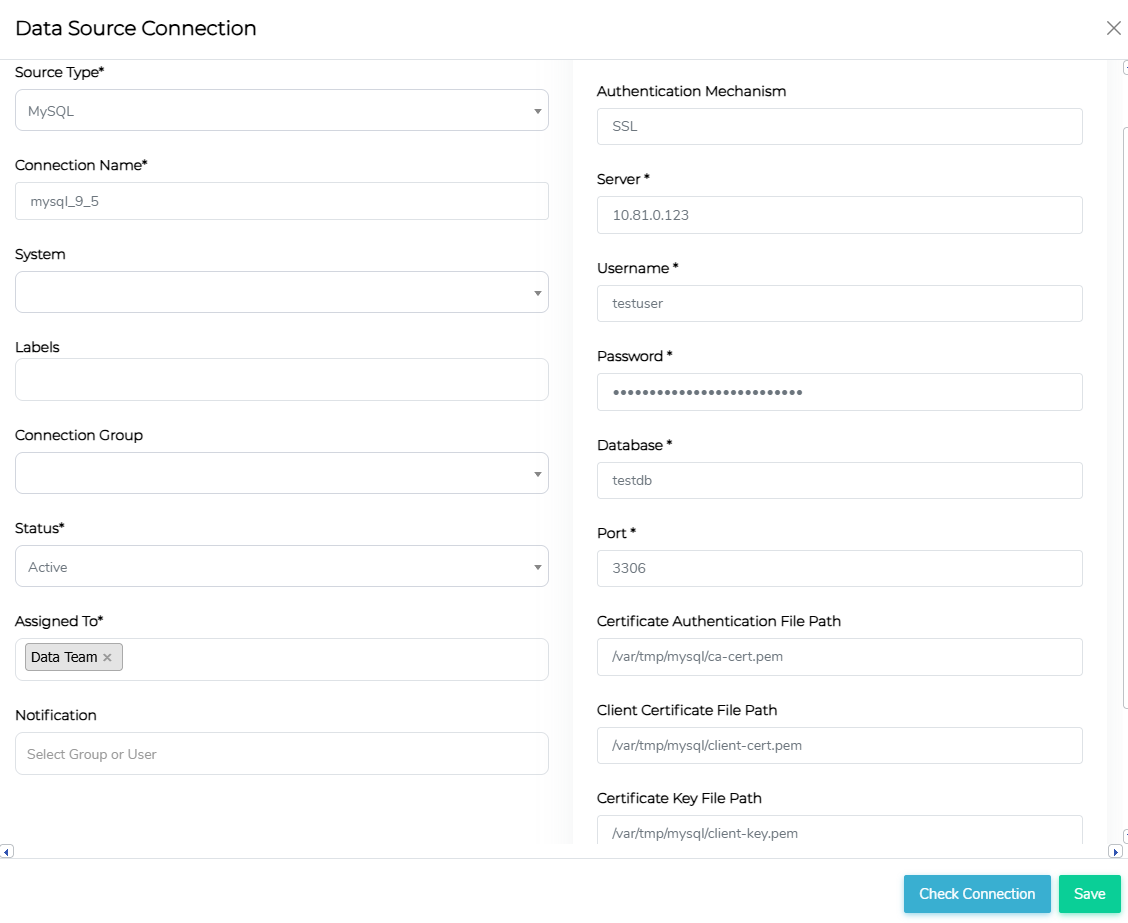
Example UI Configuration for MySQL/MariaDB
| UI Field | Example Value |
|---|---|
| Server | 10.81.0.123 |
| Username | testuser |
| Password | securepassword |
| Database | testdb |
| Port | 3306 (default) |
| Certificate Authentication File Path | /var/tmp/mysql/ca-cert.pem |
| Client Certificate File Path | /var/tmp/mysql/client-cert.pem |
| Certificate Key File Path | /var/tmp/mysql/client-key.pem |
✅ Note: If the CA certificate is not required, leave Certificate Authentication File Path blank.
2. MSSQL SSL Configuration
MSSQL connections use default system-wide certificate stores to establish secure connections.
Default Certificate Store Locations
| OS Version | Certificate Store Path |
|---|---|
| RHEL 7-9 | /etc/pki/tls/cert.pem |
| Ubuntu 18-24 | /etc/ssl/certs |
Example UI Configuration for MSSQL
In the data source connection screen, select the required Authentication Mechanism and select SSL/TLS Connection as Yes
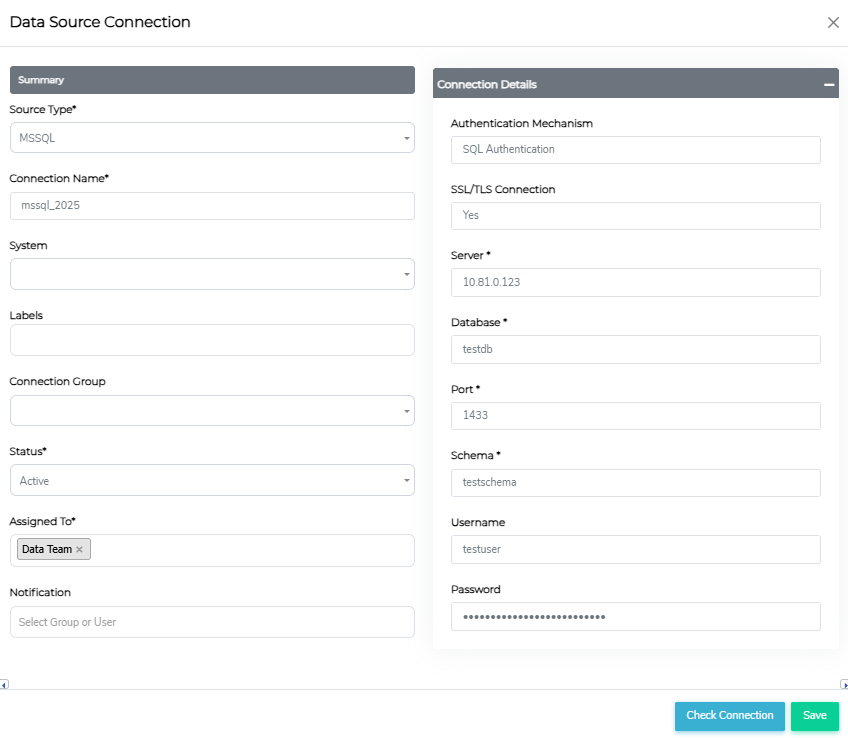
| UI Field | Example Value |
|---|---|
| Authentication Mechanism | SQL Authentication |
| SSL/TLS Connection | Yes |
| Server | 10.81.0.123 |
| Database | testdb |
| Port | 1433 (default) |
| Schema | testschema |
| Username | testuser |
| Password | StrongPass123 |
✅ Note: Ensure MSSQL is configured to require SSL connections. Microsoft ODBC Driver handles SSL/TLS and validates certs against the OS trust store.
So when using an internal Certificate Authority:
- Linux (Ubuntu/Debian): Copy your CA certificate to
/usr/local/share/ca-certificates/and run:sudo update-ca-certificates - Linux (RHEL/CentOS): Copy the certificate to
/etc/pki/ca-trust/source/anchors/and run:sudo update-ca-trust
Then from Data Source Connection screen, select "YES" for "SSL/TLS Connection".
3. Oracle SSL Configuration
Oracle databases use a combination of DSN (tnsnames.ora) and Wallet-based authentication to enable SSL.
Example UI Configuration for Oracle
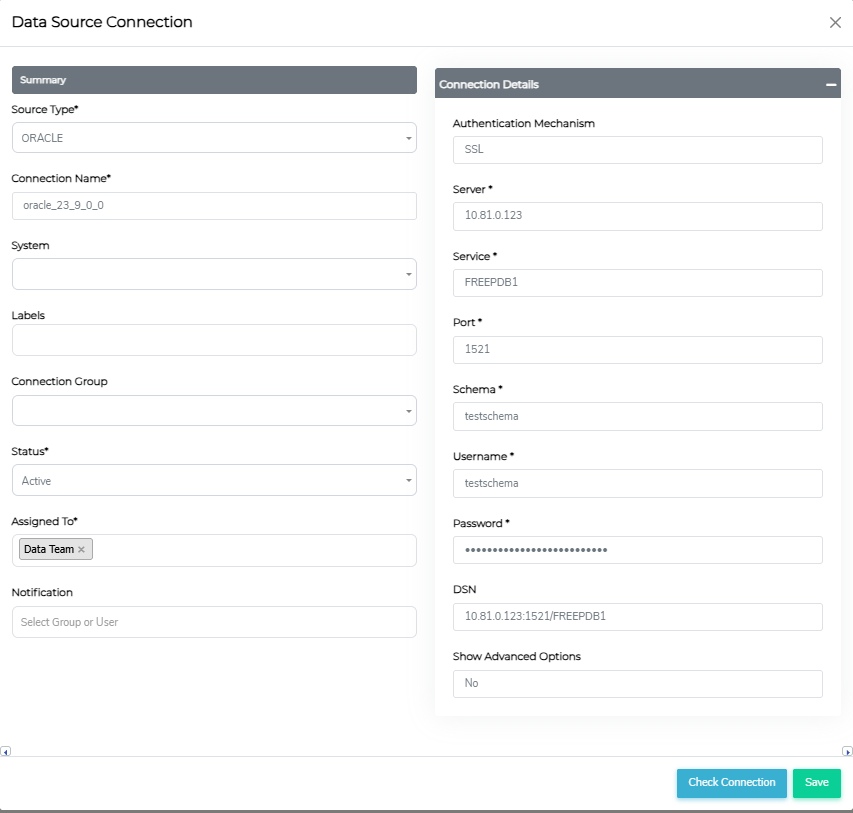
| UI Field | Description & How to Determine the Value | Example Value |
|---|---|---|
| Server | The Oracle database host or listener endpoint. | 10.81.0.123 |
| Username | Oracle schema/user account used for authentication. | testschema |
| Password | Password for the Oracle user account. | SecureOraclePass |
| Schema | Oracle service name or database identifier. | testschema |
| Port | Oracle listener port (default: 1521). | 1521 |
| DSN | The Oracle alias or connect descriptor for the target service. | 10.81.0.123/FREEPDB1 |
✅ Note: Ensure tnsnames.ora and sqlnet.ora are configured for SSL. The user should enter the alias from the tnsnames.ora file (which is configured with a wallet) into the DSN field.
✅ DSN Format: The DSN format supported by Python oracledb driver expects one of the following formats:
- Easy Connect format:
host:port/service_name?...
- Net descriptor format (without JDBC prefix):
(DESCRIPTION=
  (ADDRESS=(PROTOCOL=TCP)(HOST=<host>)(PORT=<port>))
  (CONNECT_DATA=
    (SERVICE_NAME=<service_name>)
  )
)
Oracle Quick Verification Checklist
- Verify the DSN/alias resolves and the listener is reachable:
tnsping <net_service_name>
- Test a TLS connection from the client host:
sqlplus user/password@<net_service_name>or use a Pythonoracledbtest script.
- Confirm wallet and
sqlnet.ora/tnsnames.oraplacement and permissions:- Typical locations:
$TNS_ADMIN,$ORACLE_HOME/network/admin; wallet files includeewallet.p12orcwallet.sso. - Ensure private key/wallet files are owner-only readable.
- Typical locations:
- Use
opensslto probe the listener certificate (optional):openssl s_client -connect <host>:<port> -showcerts
- Check certificates for expiry and validity:
openssl x509 -noout -enddate -in /path/to/ca.pem
- Inspect listener and database logs for SSL-related errors (ORA- or listener messages).
4. PostgreSQL SSL Configuration
PostgreSQL allows multiple SSL modes, which determine encryption security levels.
Supported SSL Modes
| SSL Mode | Eavesdropping Protection | MITM Protection | Use Case |
|---|---|---|---|
| disable | ❌ No | ❌ No | No encryption, minimal overhead. |
| allow | ✅ Maybe | ❌ No | Encrypt if the server insists. |
| prefer | ✅ Maybe | ❌ No | Encrypt if supported, but not required. |
| require | ✅ Yes | ❌ No | Always encrypt, trust network. |
| verify-ca | ✅ Yes | 🔄 Depends on CA policy | Encrypted + trusted CA certificate. |
| verify-full | ✅ Yes | ✅ Yes | Encrypted + strict server verification. |
Example UI Configuration for PostgreSQL
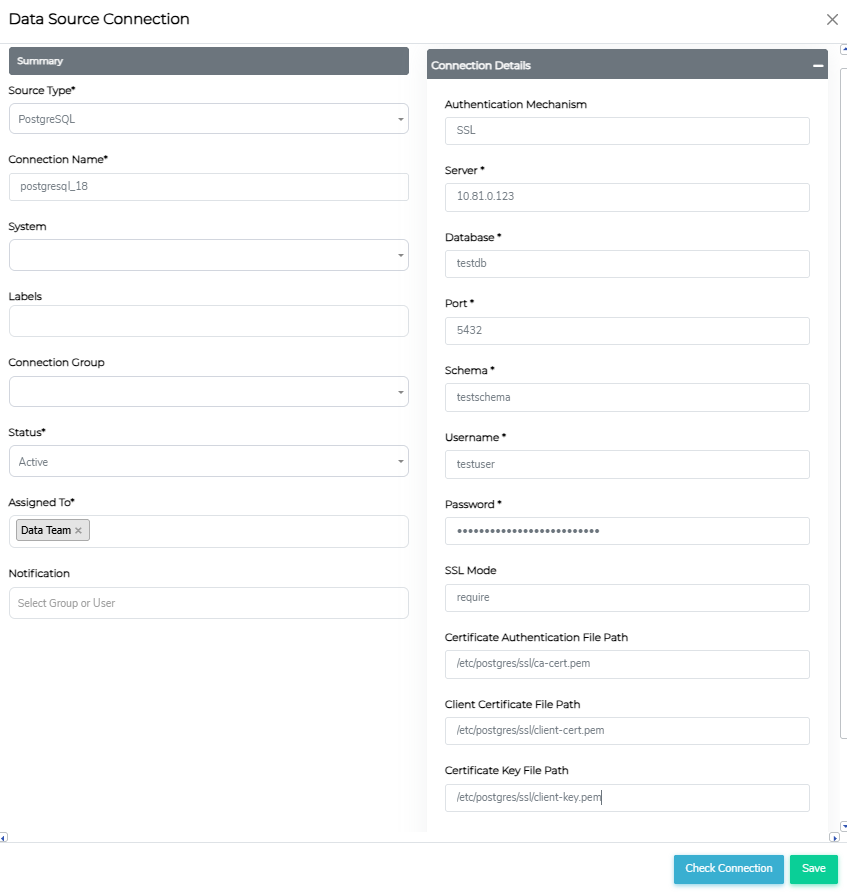
| UI Field | Example Value |
|---|---|
| Server | 10.81.0.123 |
| Database | testdb |
| Port | 5432 (default) |
| Schema | testschema |
| Username | testuser |
| Password | SecurePostgresPass |
| SSL Mode | require |
| Certificate Authentication File Path | /etc/postgres/ssl/ca-cert.pem |
| Client Certificate File Path | /etc/postgres/ssl/client-cert.pem |
| Certificate Key File Path | /etc/postgres/ssl/client-key.pem |
✅ Recommended: Set SSL Mode to verify-full for the highest security.
5. Sybase SSL Configuration
Enov8 TDM supports SSL for Sybase through a TLS wrapper layer (for example: stunnel, sidecar proxy, or VPN).
For Sybase, run the TLS wrapper and change connection details in Enov8 TDM accordingly:
- Set
Serverto the TLS wrapper endpoint host. - Set
Portto the TLS wrapper listener port. - Keep
Username,Password, andDatabaseas Sybase credentials/database values.
Example UI Configuration for Sybase (TLS wrapper)
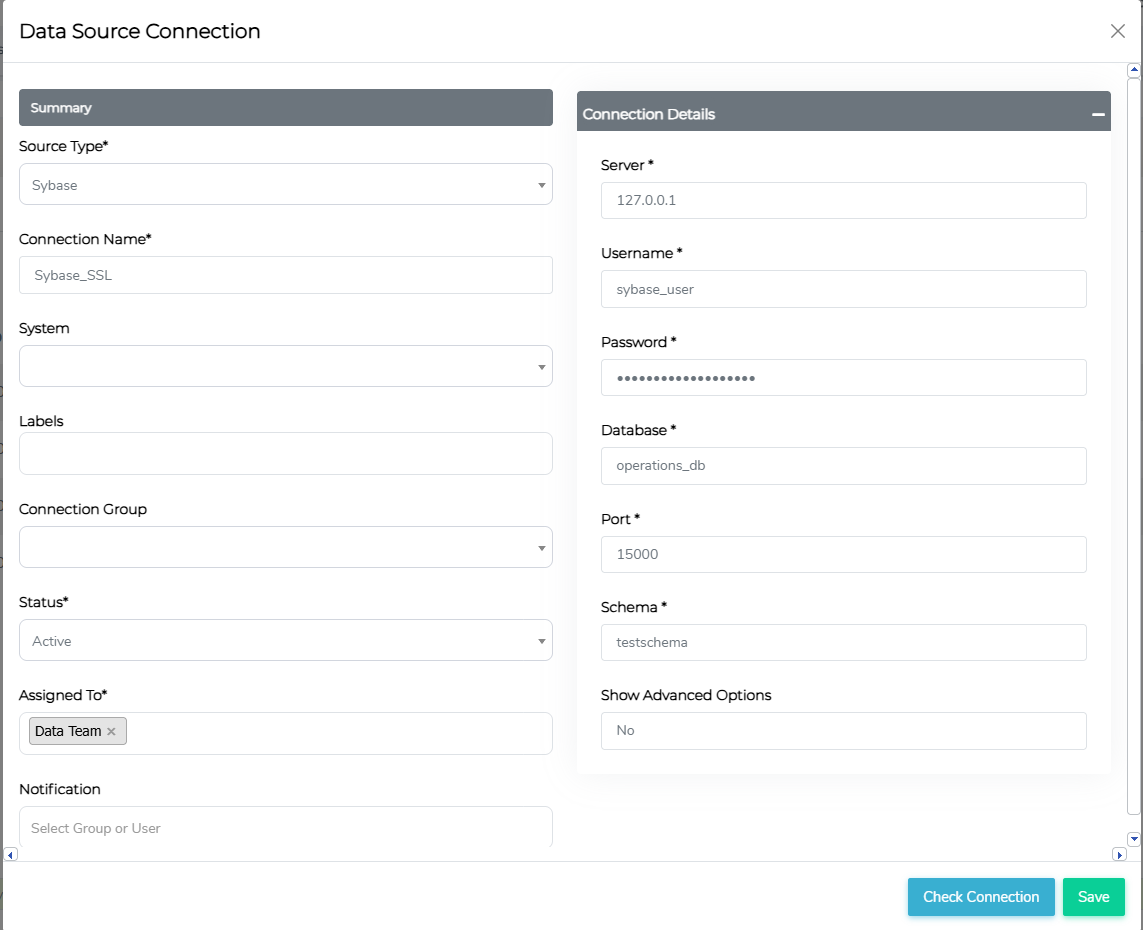
| UI Field | Example Value |
|---|---|
| Server | 127.0.0.1 |
| Username | sybase_user |
| Password | StrongSybasePass123 |
| Database | operations_db |
| Port | 15000 (TLS wrapper listener) |
| Schema | testschema |
✅ Note: TLS certificates and trust are handled by the wrapper/proxy layer, not in this Sybase connection table.
Best Practices for SSL/TLS Configuration
- Use the highest security mode possible
- For PostgreSQL, use verify-full.
- For MSSQL, verify certificate trust.
- For Sybase, enforce TLS policy in the wrapper/proxy layer.
- Ensure certificates are stored in a secure location
- Store certificates in restricted-access directories (
/etc/security/ssl/). - Limit permissions to root or the database user.
- Store certificates in restricted-access directories (
- Keep certificates updated
- Regularly rotate TLS certificates.
- Check for certificate expiration.
Final Notes
- If client certificates are not required, leave those fields blank.
- Ensure the database server or wrapper layer supports SSL/TLS and is configured accordingly.
- Use trusted certificate authorities (CAs) to avoid untrusted connection errors.