
1.10.0 Major Release Items
What's New
Choose What Each Onboarding Workflow Does
New Onboarding shows a workflow as the pipeline it runs: Ingest, Snapshot, Send, Clone and Mount. Tick only the parts you need. A workflow that skips Ingest starts from a source already on the appliance, and one that skips Snapshot starts from an existing snapshot, so refreshing a test copy from last night's snapshot is a Clone + Mount workflow of a few steps. Combinations that cannot run are refused before the workflow is created.
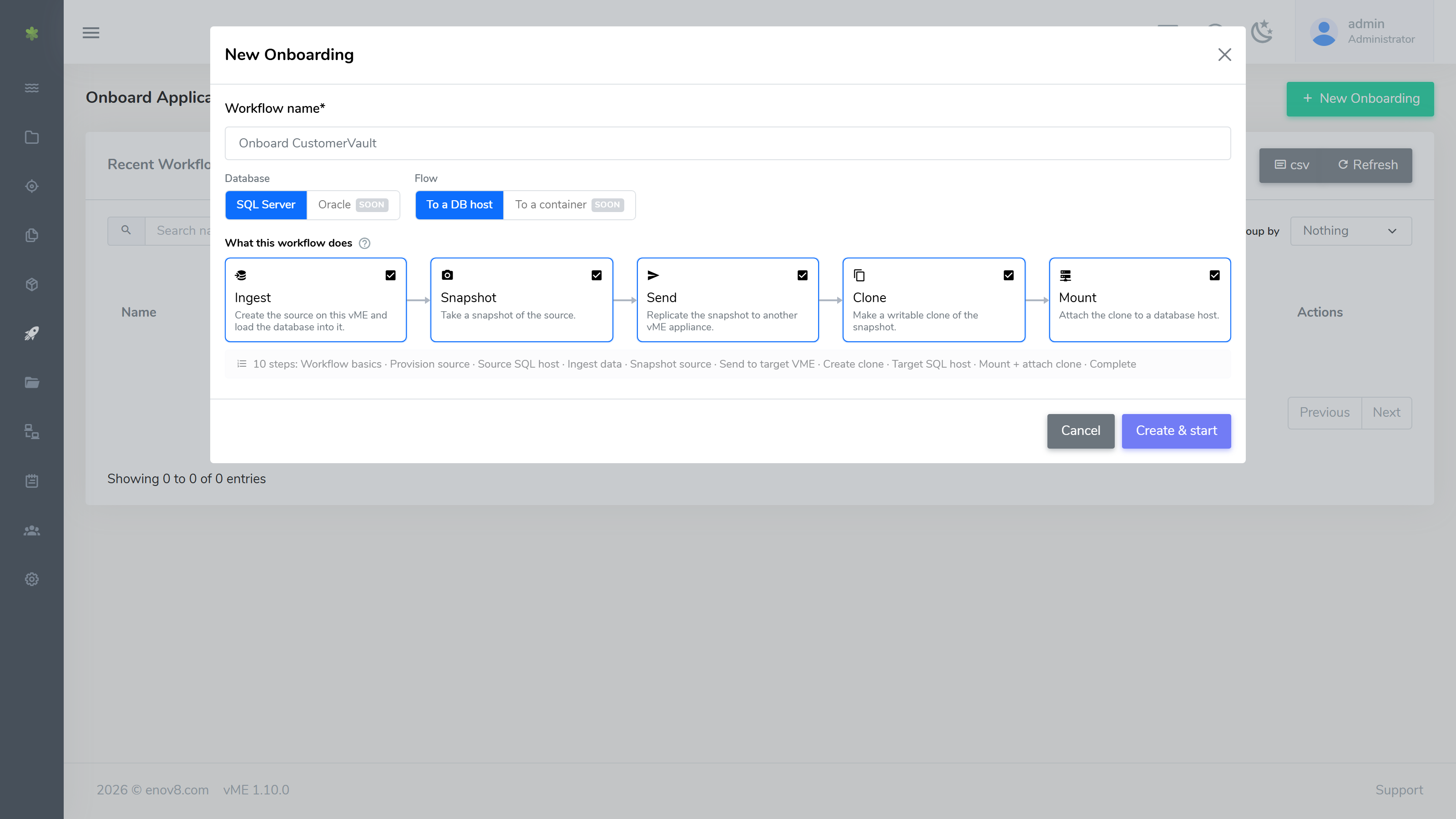
See Onboard Application for the full workflow.
One Volume per Database, Mounted as a Folder
Each SQL Server database is onboarded onto a single volume, and every volume mounts as a folder under the host's vME folder: <vME folder>\sources\<id> for a source and <vME folder>\clones\<id> for a clone. A host can hold as many volumes as it needs, and a folder path tells you at a glance which dataset a volume belongs to. You choose the vME folder when you install the Windows connector, and you can change it later in the connector's tray settings.
Snapshots and Rollbacks Coordinated with the Host
vME stops and starts the host's databases for you around a snapshot or a rollback, so a volume a SQL Server host has mounted is never changed under that host. When you take a snapshot of a mounted source, or Create Bookmark or Rollback To Bookmark on a mounted clone, the host's agent:
- takes the databases on that volume offline and takes its disk offline,
- waits while vME takes the snapshot or rolls back,
- brings the disk back at the same folder and sets the databases online again.
Each step is shown as the host reports it.
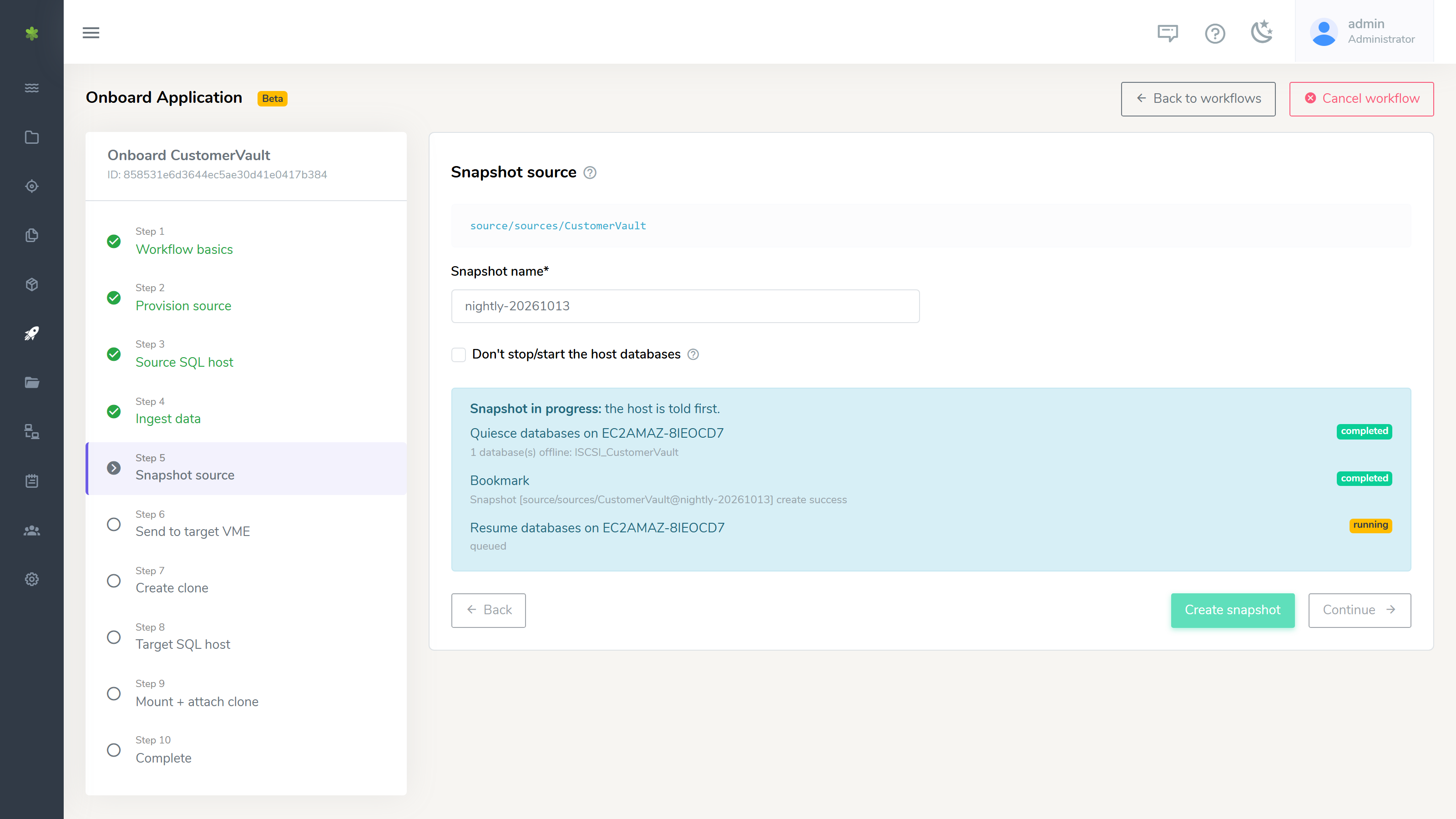
The onboarding wizard's Snapshot step does the same. Tick Don't stop/start the host databases only when you have already taken them offline yourself. If no agent can reach the host, vME refuses and lists the steps to do it by hand; once the databases are offline, Proceed without the host finishes the job.
See iSCSI Connector for details.
See Where Every Dataset Is Attached
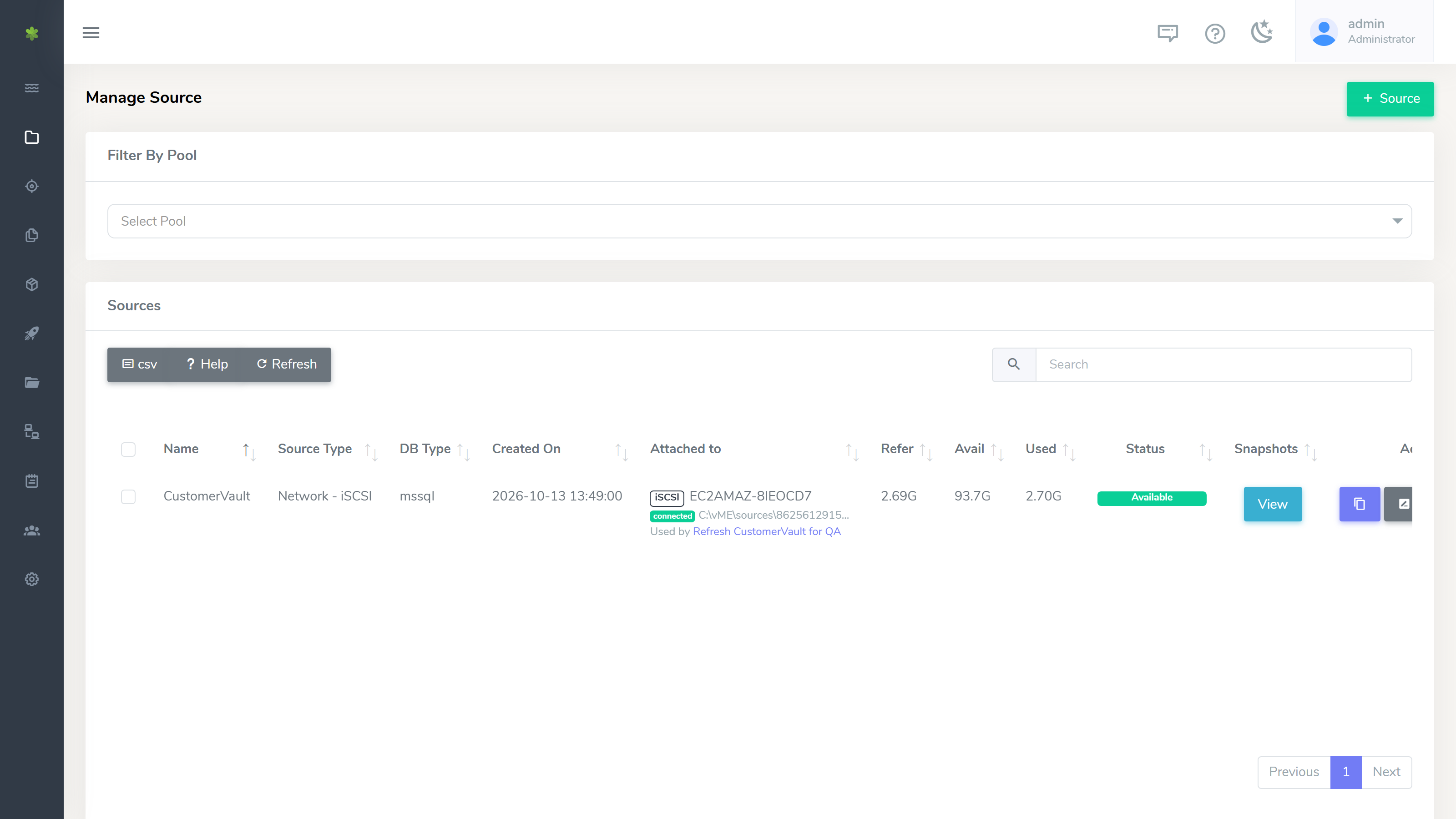
The Sources, Snapshots and Clones lists show what is attached where and who is using it:
- Attached to names the host that has the volume mounted, whether it is connected, and the folder it is mounted at.
- Used by links to the unfinished workflows that depend on a dataset.
- Sources and clones show when they were created.
- Tick several rows and Delete selected. vME deletes clones first, then snapshots, then sources, and explains in plain words anything it will not delete, for example a source that still has snapshots or one an unfinished workflow is using.
Rename iSCSI Sources and Clones
Sources and clones exported over iSCSI can be renamed from the web console, the API or the CLI. The export keeps its target name, so a host that has the volume mounted stays connected while you rename it. A dataset an unfinished workflow is using is not renamed, and the message names the workflow.
Follow Every Workflow from One List
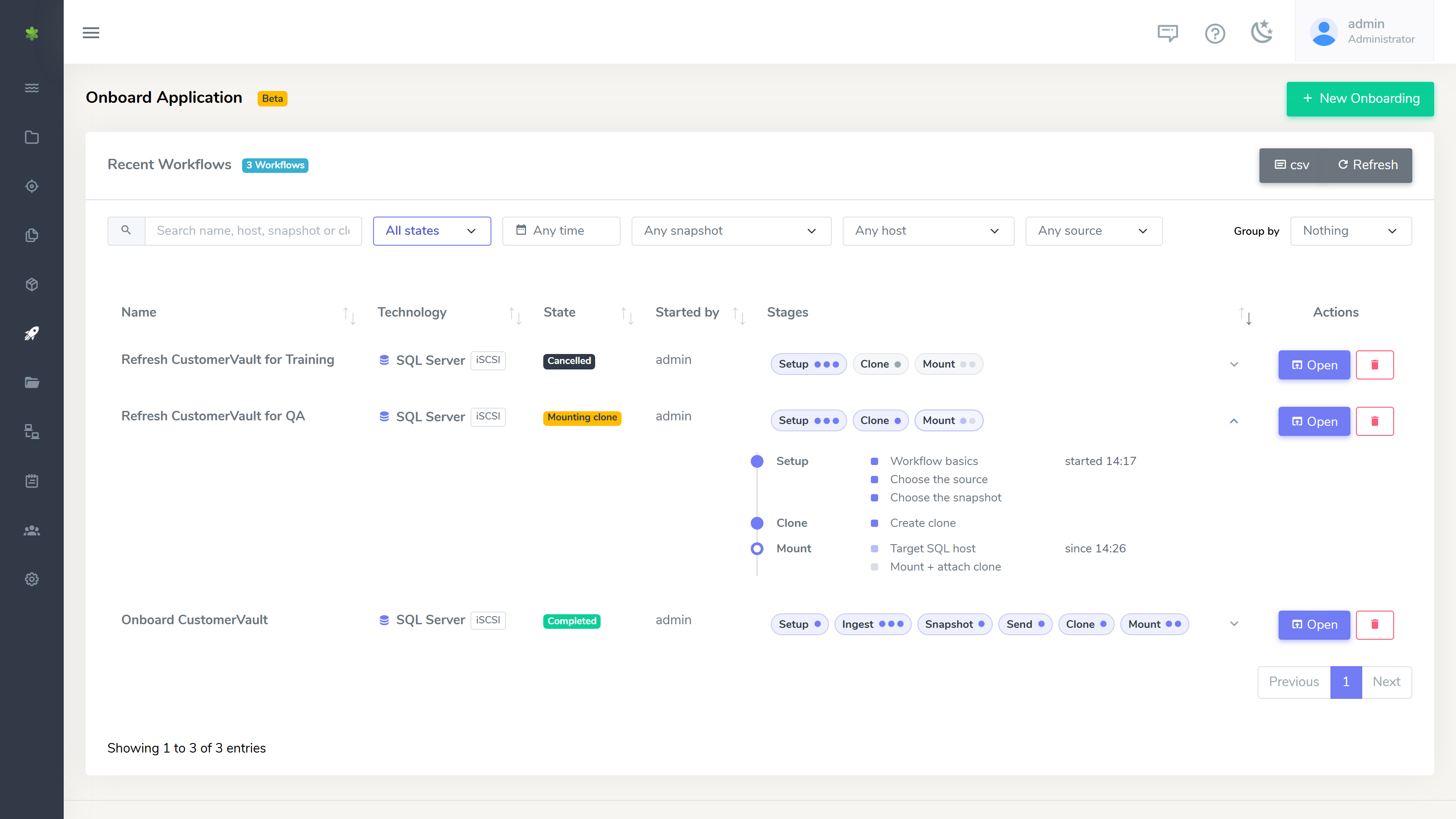
The Recent Workflows list shows each workflow's Technology, with filters for state, date, snapshot, host and source, and grouping. Open a workflow's Stages to see each step and how long it took. Deleting a workflow warns you when it mounted a clone on a host and removes only what that workflow created. A cancelled workflow opens read-only, so you can still see what it did.
Agent Manager: Host Details, Editing and Host Maintenance
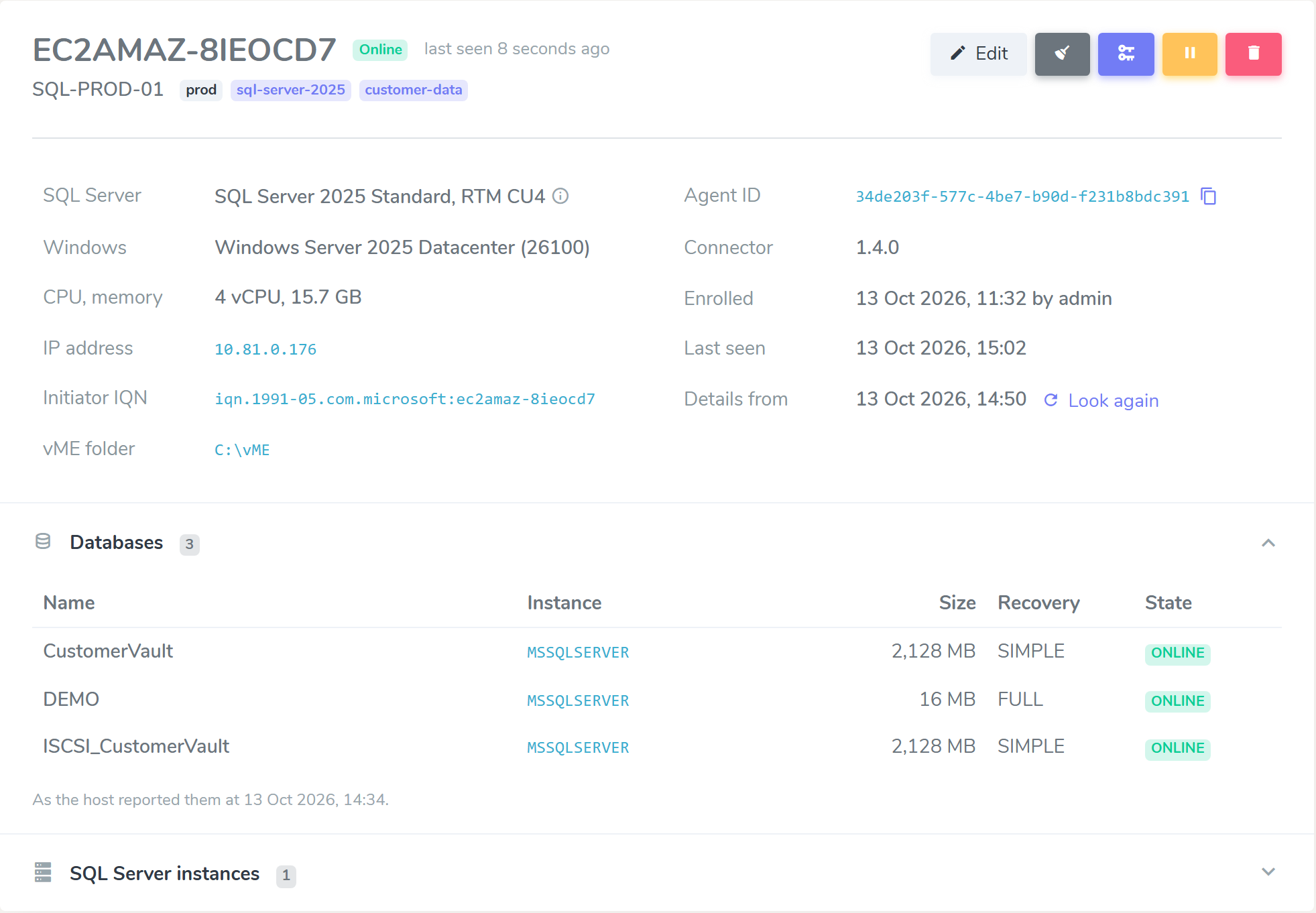
The Agent Manager lists your agents and shows each host's details as its agent reports them: Windows version, CPU and memory, domain, IP addresses, iSCSI initiator name, vME folder, SQL Server instances and versions, and the databases on the host. Edit Agent sets an agent's label, environment and tags.
Host maintenance shows every iSCSI target and portal a host still holds, marked in use, idle (the dataset is on this appliance but the host is not using it) or orphaned (no dataset on this appliance answers for it any more). Select the ones you no longer need and Forget selected: the host removes those entries and touches nothing else.
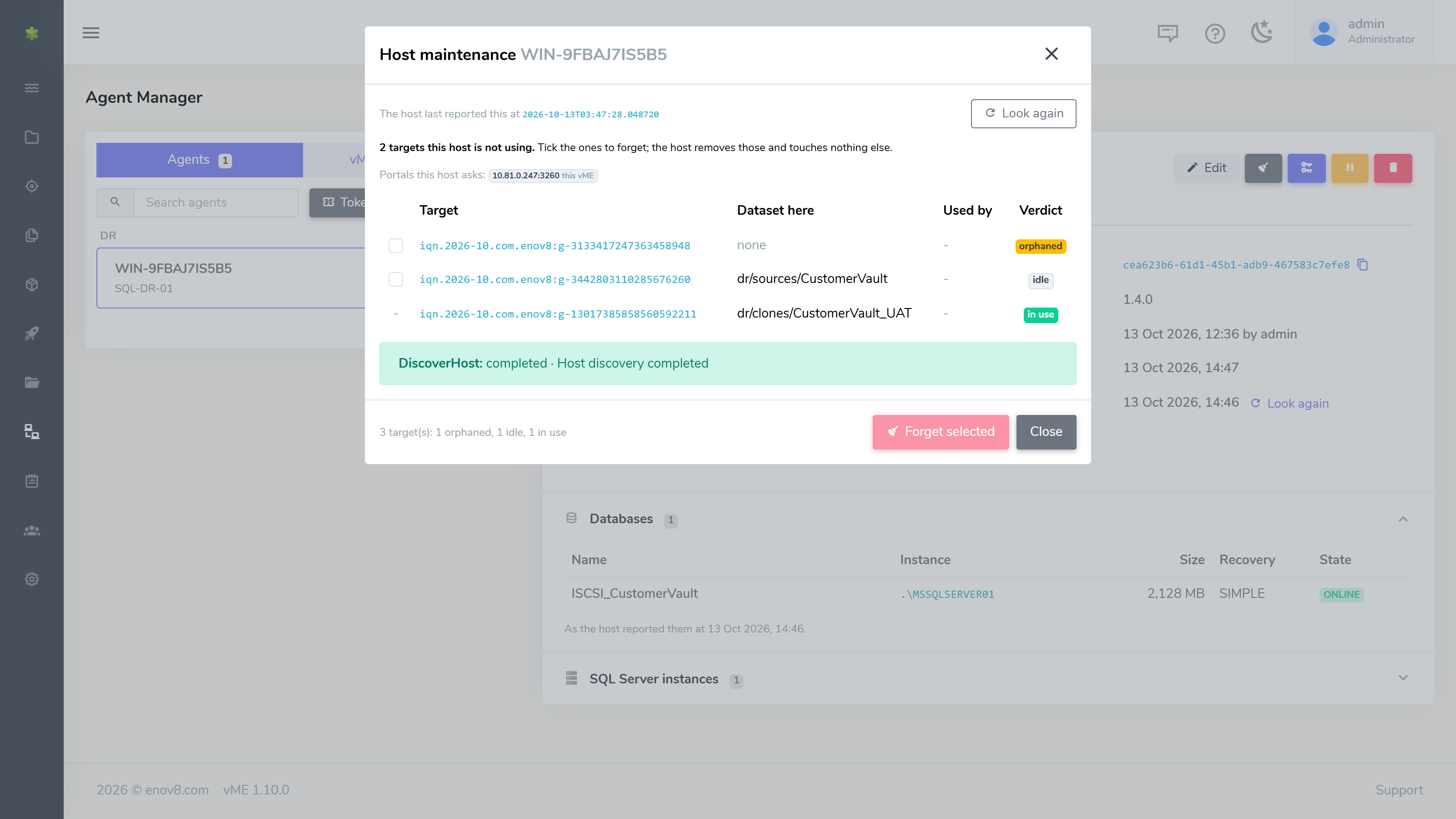
See Agent Manager for more.
Register Your vME Appliances Once
The vME Appliances tab of the Agent Manager keeps the appliances this vME sends data to. Add an appliance, Test the connection and Establish trust once. The Send step of a workflow then offers the registered appliances by name, with their pools.
Set Up a New Appliance from Its Console
A new vME appliance opens a setup menu on its console the first time it starts: configure IPv4 networking (DHCP or a static address with gateway and DNS), set the hostname and the NTP server, and test connectivity. When you finish, it shows a summary with the address to continue at, and the console keeps showing that address. The browser Setup Wizard then shows the network settings already in effect, with Edit these settings if you want to change them.
See the Setup Wizard (First Boot) Guide.
Improvements
- iSCSI exports need no client address. Creating an iSCSI source or clone asks only for its size; the export's settings show its target name. NFS exports keep their client address and user mapping.
- Safer replication. A send with Overwrite if it already exists is refused when the destination has clones, and the refusal names them. Nothing is destroyed.
- The connector keeps to its own disks. Source preparation and clone mount bring online and format only the disks behind the job's own iSCSI targets, wait for a slow disk to appear, and stop with the targets they expected and the disks they found when nothing matches. Windows automount is restored whenever a clone mount ends.
- Staging databases detach cleanly. Other connections to a staging database are closed before it is detached or restored over, so an open session does not stop an ingest or a teardown.
API Changes & Upgrading
Update the Windows connector (MSI) to 1.4.0 on your SQL Server hosts. Folder mounts, host-coordinated snapshots and rollbacks, host details and Host maintenance all need it. The installer asks for the vME folder (VME_ROOT for a silent install). vME checks what each connector reports it can do, so a host still on an older connector keeps working for what it supports, and a feature it lacks is refused with a message rather than attempted.
Workflows created before the upgrade keep their drive letters. They are shown under Advanced on the mount step.
Changes to check in a custom REST integration:
POST /snapshot/createandPOST /snapshot/rollbackon a mounted iSCSI dataset can answer202 Acceptedwith atask_idwhile the host is coordinated. PollGET /snapshot/task/<task_id>. A refusal answers409with the manual steps; pass"skip_host": trueonly once you have taken the databases offline yourself.- iSCSI
network_infotakes noclient_address,anonuidoranongid. NFS keeps all three. - Workflows take
parts,start_fromandconfig_mode, and returnpartsandlive_steps. Each SQL Server database uses one volume. POST /source/renameandPOST /clone/renameaccept iSCSI datasets. A dataset an unfinished workflow is using answers409withused_by.- A request without a username or api-key answers with a JSON error rather than a server error page.
New endpoints:
- The appliance registry:
/peerand/peer/<id>withtest,trust,poolsandagents. DELETE /object/destroydeletes up to 100 sources, snapshots and clones in one call and reports each one.PATCH /agentwith"action": "update"sets an agent'slabel,environmentandtags. Agent listings return each agent's tags, capabilities and host details.- Source and clone listings return
guid,attached_toandused_by.
The vME API reference documents every route, and the vME Postman collection includes an Onboarding (API) folder that runs the one-volume, folder-mount flow.
CLI: vme snapshot create and vme snapshot rollback take --skip_host and --wait; without --wait they print the task id. New vme peer and vme object destroy commands match the API. See the CLI guide.