Configure TDM & Workerbee Agents
This guide covers connecting TDM to your Workerbee agents.
Ensure that at least one TDM Workerbee agent is installed on your infrastructure.
- HTTP/HTTPS traffic must be enabled in both directions (bidirectional) between Ecosystem and the TDM Workerbee endpoint(s) (
/dcs/) over the required port (typically80or443).
Verify Connectivity (Required)
Confirm bidirectional HTTP/HTTPS reachability between Ecosystem and TDM Workerbee before configuration.
Use the Ecosystem Credentials Health Check as validation. It confirms DCS server health and validates DCS -> Ecosystem API credentials.
Configure TDM System
To access TDM system configuration settings, navigate to Settings > System Config > Application URLs.
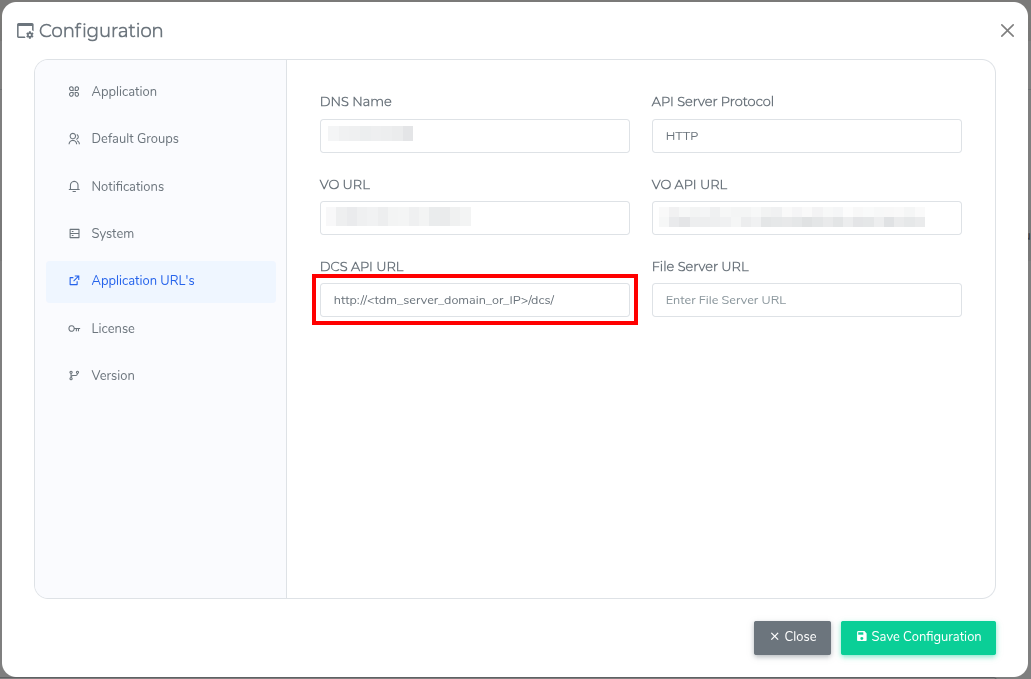
Enter the URL of your TDM Workerbee agent in the DCS API URL field (mandatory).
Important: If this URL is not reachable over HTTP/HTTPS from Ecosystem, communication between Ecosystem and TDM Workerbee(s) will fail.
Format: http(s)://domain_name_or_IP/dcs/
Examples:
https://workerbee-server.company.com/dcs/http://10.0.1.50/dcs/
Complete any other required fields, then click Save Configuration.
Optional: Add Additional Workerbee Agents
TDM System must already be configured with your first Workerbee.
TDM WorkerBee agents enable load balancing, secure multi-domain connectivity, and built-in high availability, ensuring TDM runs efficiently, scales smoothly, and remains resilient against failures.
To configure a Workerbee agent in the platform, go to Data > Administration > Data Agent Management. This will open the Manage Agents screen.
To create a new agent, click Add. The Agent Details form will then be displayed.
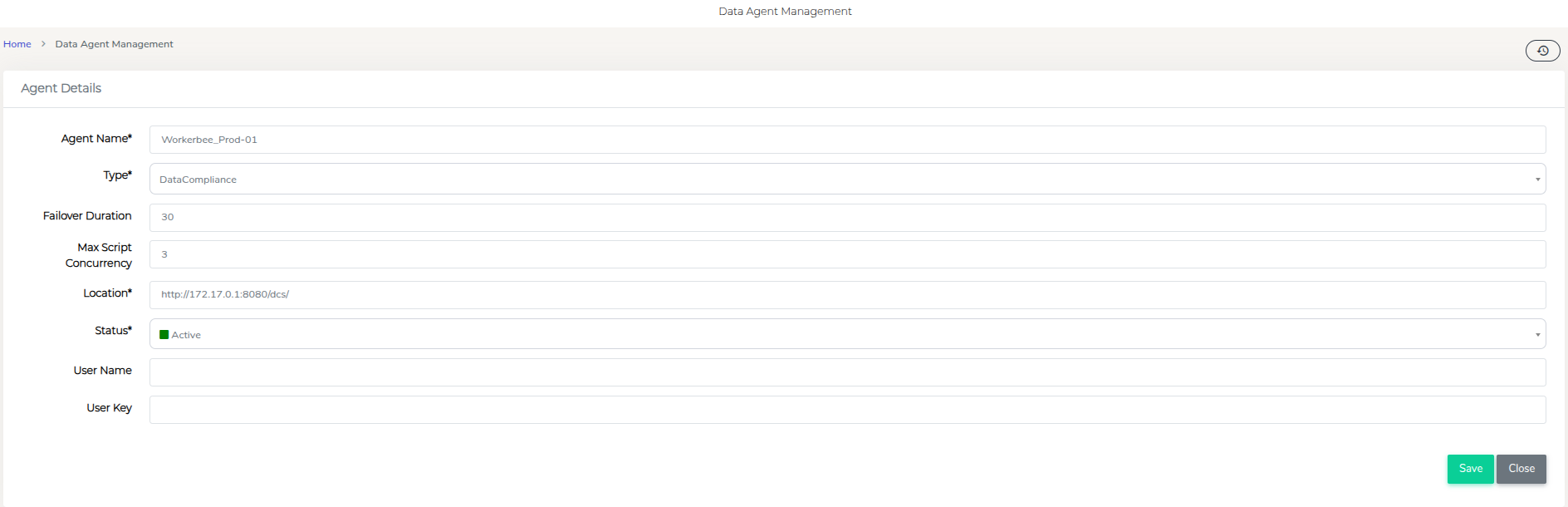
| Field | Description |
|---|---|
| Agent Name | Unique identifier for the workerbee agent. (e.g - "Workerbee_Prod-01") |
| Type | Select the agent type from the dropdown menu. |
| Failover Duration | Time (in seconds) to wait before routing work to another agent. |
| Max Script Concurrency | Maximum number of scripts that can run concurrently. Adjust based on server specification. |
| Location | TDM Workerbee Agent's Server location. |
| Status | Agent Status (Active/Inactive). |
| User Name | Username for authentication, if applicable. |
| User Key | Authentication key, if required. |
Once all fields are entered click Save to add the new agent. Or click Close to exit without saving.