Validation
Overview of Validation
Validation confirms that masking worked. It checks each masked column to see if the original production values are still present, which would indicate that unmasked production data remains.
From TDM 3.12, validation runs automatically at the end of every masking execution, for both database and file connections. It uses the masking configuration of the run, so no separate validation configuration is needed.
Validation configurations and standalone validation scans were retired in TDM 3.12. Validation can no longer be configured or executed on its own, and profiling no longer generates a validation configuration. Results from earlier validation scans are still available to view.
How Validation Works
After a column is masked, TDM compares the masked values against the source values and the lookup used by the masking function, and gives the column a validation score.
| Result | Meaning |
|---|---|
| Masked | The validation score is 95% or higher. |
| Not Masked | The validation score is below 95%. The column should be reviewed. |
| Skipped | The column could not be validated. The reason is shown in the log. |
Each column's result and score are also written to the masking log.
If a masking execution fails, validation does not run for that execution.
Viewing Validation Results - Single Data Source
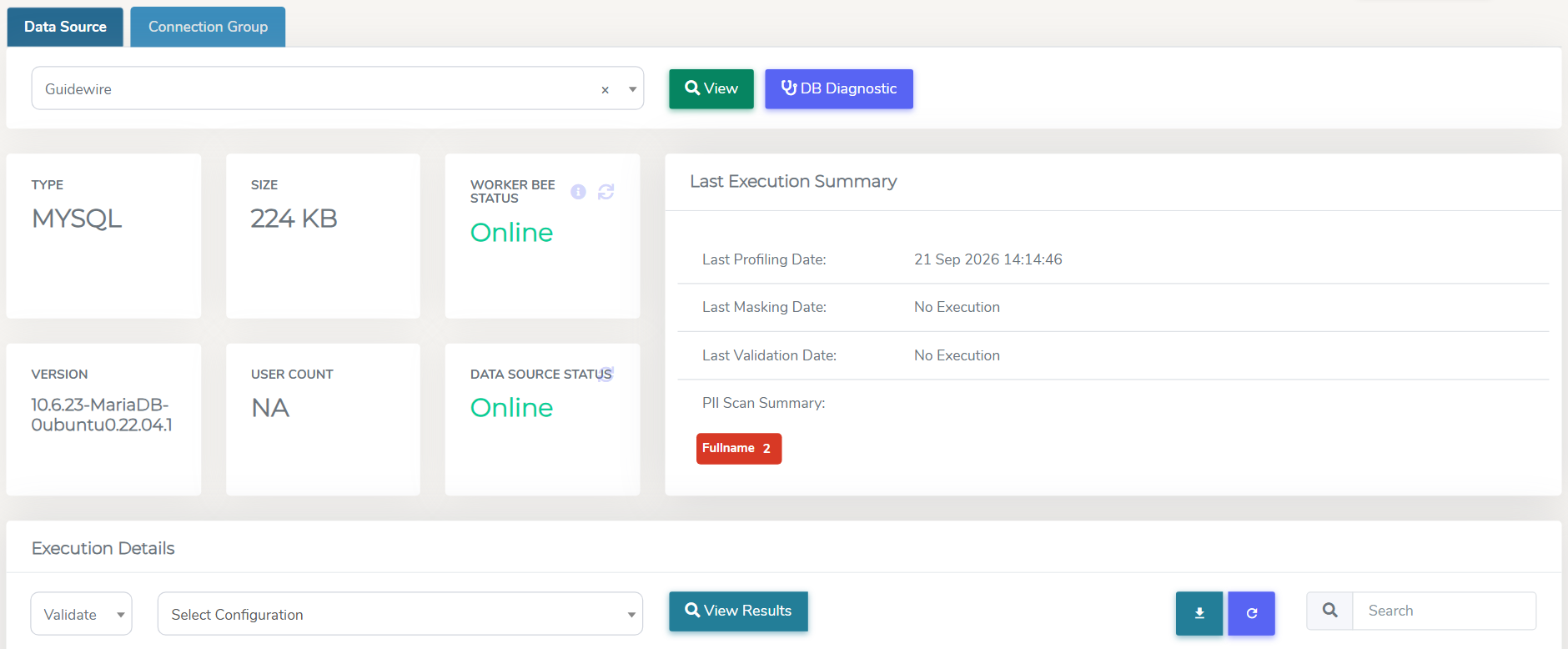
To view validation results, navigate to Data Management Hub > Execution Console.
Select your data source and press View. Scroll down to the Execution Details section, select Validate in the first dropdown menu, then click View Results to see the validation executions for that data source.
Validation Log
In the Details column, the Log button can be used to view logs for the execution.
Validation Report - Single Data Source
Successfully completed Validations will generate a Validation Report which can be viewed by clicking the Report button.
This can also be searched on or exported out to Excel or CSV.
Validation Report Table
| Type | Description |
|---|---|
| Connection Name | The name of the data connection. |
| Schema | The schema under which the table resides. |
| Table Name | The name of the table containing the data. |
| Column | The specific column within the table. |
| Data Type | The type of data stored in the column (e.g., string, integer, date). |
| Data Length | The maximum length of the data in the column. |
| Masking Pattern Used | The pattern applied to mask the data in the column. |
| Masking Lookup Used | Lookup table or source used during the masking process. |
| Masking Parameters Used | Parameters applied during the masking process. |
| Result | The outcome of the validation operation. |
| Validation Score | The score indicating the effectiveness of the validation process. (%) |
| Scan Duration (Seconds) | The duration taken to complete the scan, measured in seconds. |
| Error Details | Details of any errors encountered for the respective column. |
Validation Report - Connection Groups
When a connection group is masked, each data source in the group is validated and generates its own Validation Report, which can be viewed by clicking the Report button.
In order export the reports in bulk, navigate to the Execution Console section in the Connection Group tab, and select the data sources to include in the bulk report.
Click Generate Report, then select the required date range. For option details and step-by-step instructions, see Generating Single TDM Report.
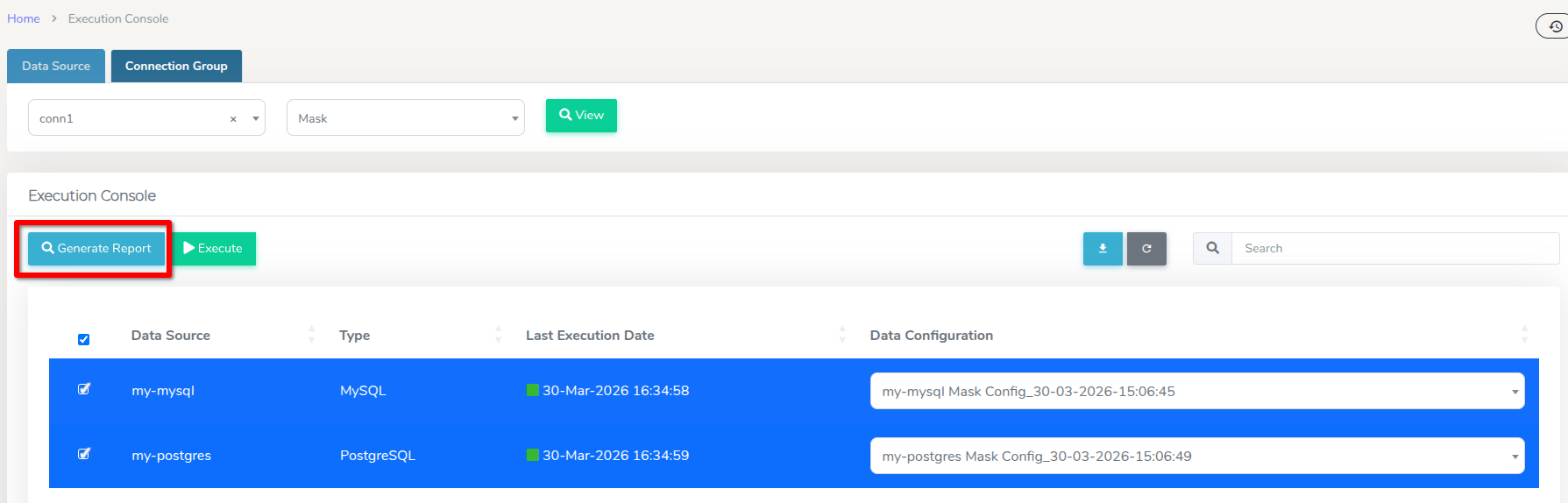
Important: Databases and files have different report structures, therefore their reports cannot be generated together in bulk. When selecting the data sources to include in the bulk report, make sure that files and database connections are not selected together.
Masking Pattern Support
Some masking operations, like unique hashes or encryption, cannot be validated because TDM can't determine whether those values were set by its masking function. For 'ManyToOne' functions, TDM checks the masked values against the lookup tables, but for unique hashes there's no way to confirm they were applied by TDM. The tables below outline which masking patterns are supported and which are not.
Masking Pattern Support Matrix
| Pattern Name | Category | Supported? | Reason Not Supported |
|---|---|---|---|
| TFN_ManyToOne | TFN | ✅ | |
| ACN_ManyToOne | ACN | ✅ | |
| ABN_ManyToOne | ABN | ✅ | |
| Telephone_ManyToOne | Tel No. | ✅ | |
| Telephone_FixedValue | Tel No. | ✅ | |
| Telephone_HashLast4Digits | Tel No. | ❌ | Last 4 digits masked using a secure hash; verification not possible as values are not linked to lookup tables. |
| Address_ManyToOne | Street Address | ✅ | |
| Address_FixedValue | Street Address | ✅ | |
| Email_ManyToOne | ✅ | ||
| Email_FixedValue | ✅ | ||
| Email_UniqueID | ❌ | The part before the '@' is replaced with a unique ID, making it impossible to match with the original value for validation. | |
| Organisation_ManyToOne | Org Name | ✅ | |
| Organisation_FixedValue | Org Name | ✅ | |
| Surname_ManyToOne | Surname | ✅ | |
| Surname_FixedValue | Surname | ✅ | |
| Firstname_ManyToOne | Firstname | ✅ | |
| Firstname_FixedValue | Firstname | ✅ | |
| Fullname_All_ManyToOne | Fullname | ✅ | |
| Fullname_FixedValue | Fullname | ✅ | |
| NameCharReplace | Other | ✅ | |
| Replace_With_Null | Other | ✅ | |
| Replace_With_Empty | Other | ✅ | |
| DOB_FixedValue | DOB | ✅ | |
| DOB_DaysOnly_ManyToOne | DOB | ❌ | Day value is recalculated using a hash, making it impossible to verify against the original date. |
| DOB_ManyToOne | DOB | ❌ | Date is modified using a lookup value to shift the date, which prevents matching it back to the original value. |
| Others_FixedValue | Other | ✅ | |
| Creditcard_FixedValue | CC Number | ✅ | |
| Creditcard_ManyToOne | CC Number | ❌ | Middle digits are masked using a hash and recalculated with Luhn, making it impossible to verify the original value. |
| Others_MultiPII | Other | ❌ | Each value is masked using multiple functions, making it impossible to determine the original value due to the complex and varying transformations applied. |
| Encrypt_OneToOne | Other | ❌ | Values are encrypted using a unique ID function, making it impossible to verify the original value. |
| Hash_OneToOne | Other | ❌ | Values are hashed using multiple hashing algorithms, making it impossible to match the hashed value with the original input. |
| Others_UniqueID | Other | ❌ | Values are replaced with unique identifiers, making it impossible to match them with the original value for validation. |
| Others_HashLast4Digits | Other | ❌ | The last 4 digits are hashed, making it impossible to verify if the transformation matches the original value. |
Feature Support Table
The table below outlines the validation features supported by various data source connection types:
| Connection Type | Conditional Validation | Like(%) Query Validation |
|---|---|---|
| Amazon Redshift | ✅ | ✅ |
| CouchDB | ❌ | ❌ |
| DB2 | ✅ | ✅ |
| Informix | ✅ | ✅ |
| MariaDB | ✅ | ✅ |
| MongoDB | ❌ | ❌ |
| MSSQL | ✅ | ✅ |
| MySQL | ✅ | ✅ |
| Oracle | ✅ | ✅ |
| PostgreSQL | ✅ | ✅ |
| Sybase | ❌ | ❌ |
| Teradata | ✅ | ✅ |
| File - AVRO | ❌ | ❌ |
| File - Delimited | ✅ | ❌ |
| File - Fixed Width | ✅ | ❌ |
| File - JSON | ❌ | ❌ |
| File - ORC | ❌ | ❌ |
| File - Parquet | ❌ | ❌ |
| File - XML | ❌ | ❌ |
Note: Normal validation is supported across ALL data source connection types.