Single sign-on
Admin → Settings → Single sign-on. Single sign-on needs HTTPS and outbound access from the server to your identity provider.
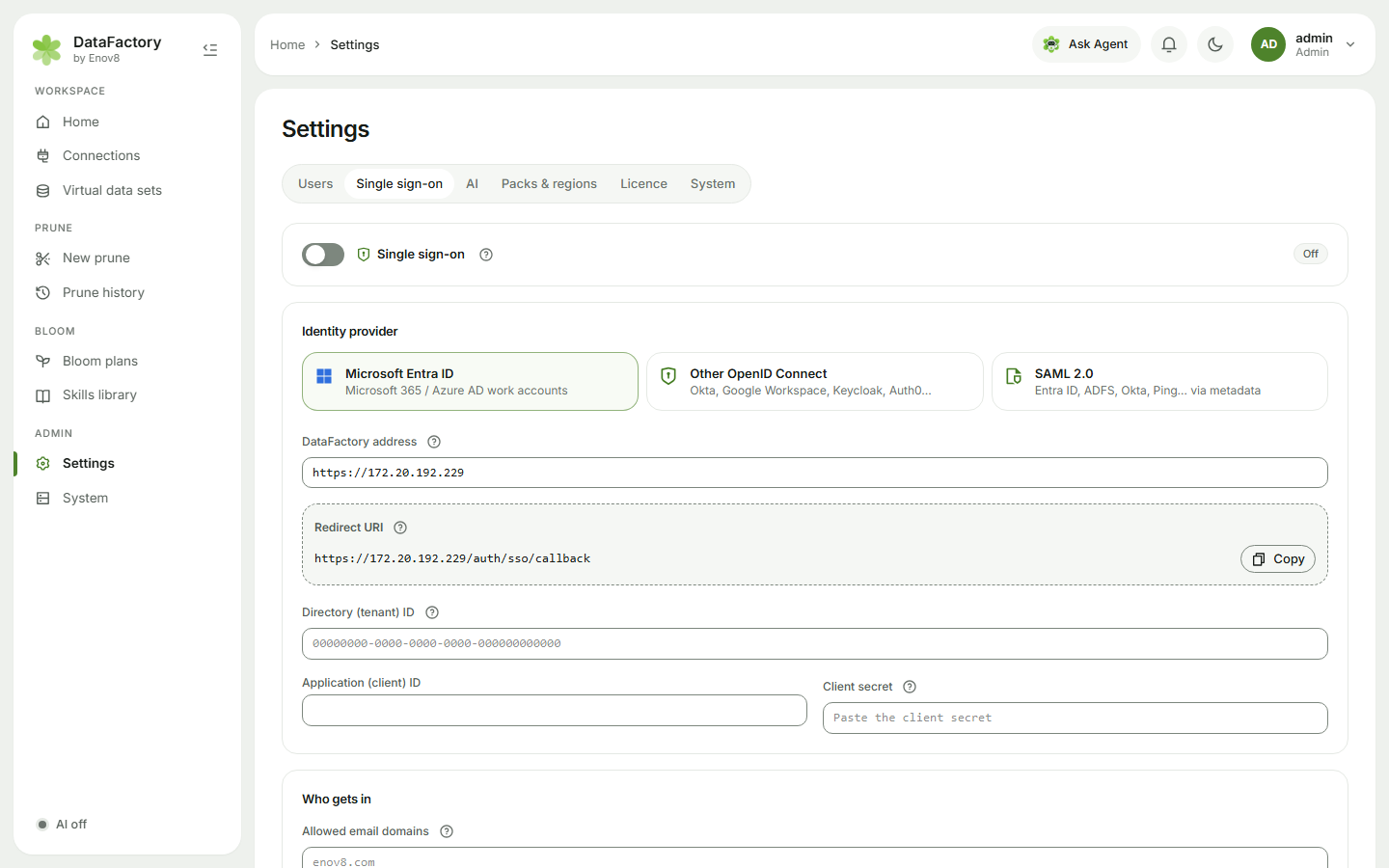
1. Identity provider
Choose Microsoft Entra ID, Other OpenID Connect (Okta, Google Workspace, Keycloak, Auth0…) or SAML 2.0, and check the DataFactory address.
Microsoft Entra ID (OpenID Connect)
- Copy the Redirect URI DataFactory shows (it ends in
/auth/sso/callback). - In the Azure portal: Microsoft Entra ID → App registrations → New registration. Name it DataFactory, choose this organizational directory only, and add the redirect URI as a Web platform.
- From the app's Overview, copy the Application (client) ID and Directory (tenant) ID.
- Under Certificates & secrets → New client secret, copy the secret's Value. Note when it expires.
- Paste the three values into DataFactory.
For other OpenID Connect providers, enter the Issuer URL, Client ID and Client secret instead.
SAML 2.0
- Copy the values DataFactory shows (Identifier (Entity ID), Reply URL (ACS), Sign-on URL, Logout URL), or give your provider the SP metadata link.
- In your provider, create a SAML application with those values. (In Entra: Enterprise applications → New application → Create your own application → Single sign-on → SAML.)
- Paste the provider's IdP metadata URL (or the metadata XML) into DataFactory. It shows the parsed sign-in URL and the certificate's expiry date.
2. Who gets in
| Setting | What it does |
|---|---|
| Allowed email domains | Only these domains can sign in, e.g. example.com. |
| Add new people automatically | First-time users are created as Members, up to your licence's user limit. |
| Trust email addresses from this provider | Link SSO to existing accounts by email (OpenID Connect only). Admin accounts are never linked automatically. |
| Allow password sign-in too | Off = everyone uses SSO. Admins can still use a password, in case the provider is down. |
| Roles from groups | Name the Group claim / attribute, then list Admin groups and, optionally, Allowed groups. |
| Single sign-out | Logging out of DataFactory also ends the provider session. |
| Button text | e.g. Sign in with Microsoft. |
Click Save, then Test provider (it checks the server can reach your provider), then switch Single sign-on on. Try it in a private window before telling everyone.
Troubleshooting
- redirect URI mismatch (AADSTS50011): the URI in Entra must match DataFactory's exactly, including https, the host and any path prefix.
- Couldn't reach login.microsoftonline.com: the server needs outbound HTTPS to Microsoft.
- When a SAML signing certificate is renewed, click Test provider to re-read the metadata.