Create a plan
Open Bloom plans and click New plan, then choose a tile: Template, SQL schema or Virtual data set.
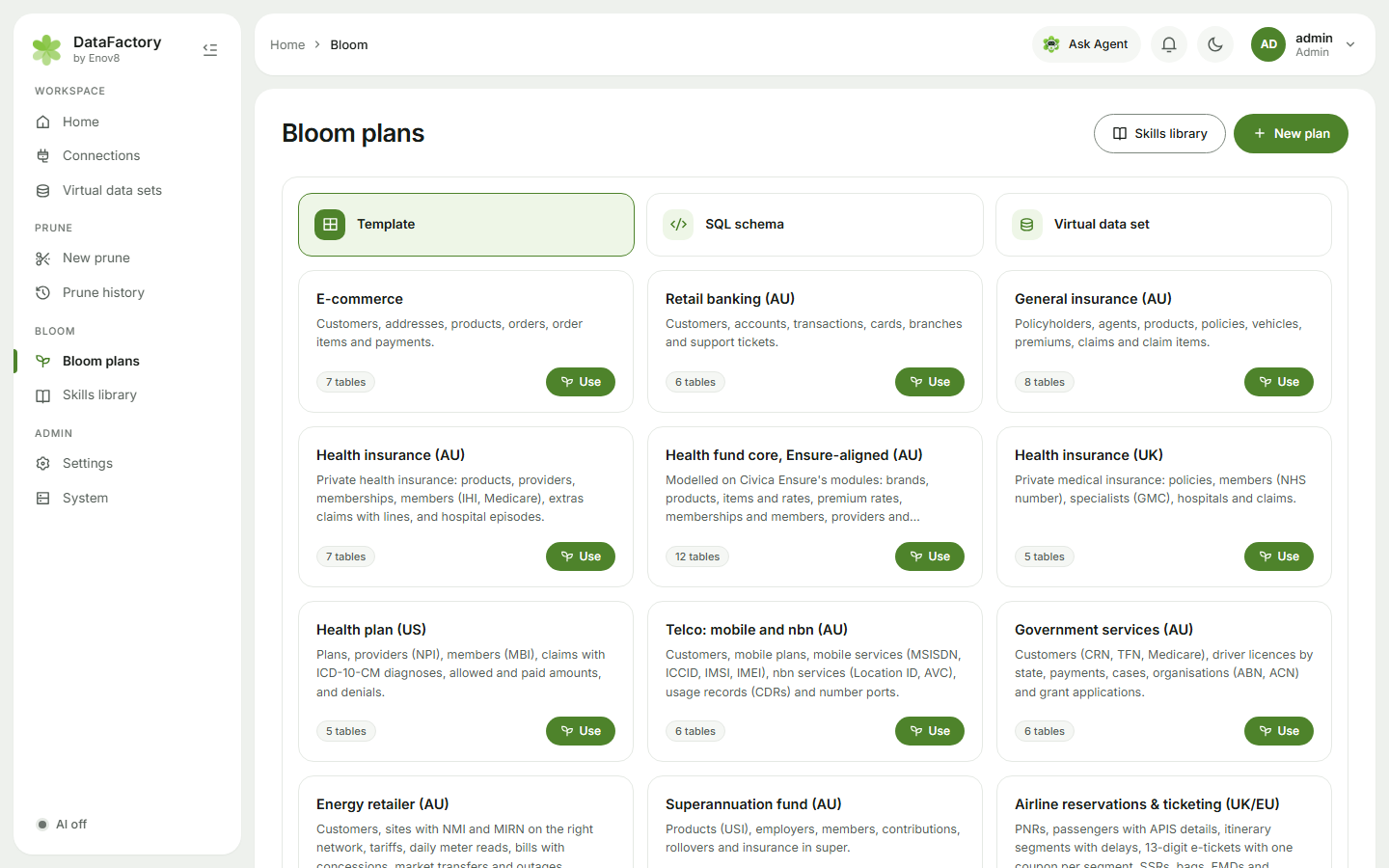
From a template
Each template is a realistic schema with skills, row counts, relationships and rules already set up. Click Use and the plan opens on Generate, ready to run. Using the same template again reopens your plan from it if you haven't run it yet; otherwise you get a new plan, named e.g. Retail banking (AU) 2.
| Template | Tables include |
|---|---|
| E-commerce | customers, addresses, products, orders, payments |
| Retail banking (AU) | customers, accounts, transactions, cards, branches, support tickets |
| General insurance (AU) | policyholders, policies, vehicles, premiums, claims |
| Health insurance (AU) | products, providers, memberships, members, extras claims, hospital episodes |
| Health fund core, Ensure-aligned (AU) | brands, products, rates, members, providers, premiums with rebate, claims |
| Health insurance (UK) | policies, members (NHS number), specialists (GMC), claims |
| Health plan (US) | plans, providers (NPI), members (MBI), claims with ICD-10-CM |
| Telco: mobile and nbn (AU) | customers, plans, mobile services (MSISDN, ICCID, IMSI, IMEI), nbn services, usage records, number ports |
| Government services (AU) | customers (CRN, TFN, Medicare), driver licences, payments, cases, grants |
| Energy retailer (AU) | customers, sites (NMI, MIRN), meter reads, bills, market transfers, outages |
| Superannuation fund (AU) | products (USI), employers, members, contributions, rollovers, insurance |
| Airline reservations & ticketing (UK/EU) | bookings (PNRs), passengers with passport details, flight segments, 13-digit e-tickets and coupons, special service requests, bags, paid extras (EMDs), EU261/UK261 claims, for British Airways, Iberia, Aer Lingus and Vueling |
| Airline reservations & ticketing (AU) | the same, on the Qantas, Jetstar, Virgin Australia and Air New Zealand network, in AUD, with customer-care claims |
| Airline reservations & ticketing (US) | the same, on the American, Delta, United, JetBlue and Southwest network, in USD, with DOT refunds |
| Airline loyalty & Avios (UK/EU) | members of The British Airways Club, Club Iberia Plus and AerClub, tiers, households, Avios earned and spent, redemptions, partners |
| Airline loyalty: Qantas & Velocity (AU) | members with tiers, family pooling, points earned and spent, status credits, redemptions, partners |
| Airline loyalty: US miles programmes | AAdvantage, SkyMiles, MileagePlus, Rapid Rewards and TrueBlue members with elite tiers, miles, redemptions, partners |
| Salesforce Sales Cloud | User, Account, Contact, Lead, Opportunity, Case |
Your admin chooses which industries and regions are shown. See Packs & regions. If a template is missing, it's probably turned off.
From a SQL schema
Choose SQL schema. Paste your CREATE TABLE statements into the box, or drop a .sql file on it (or Upload .sql file), and pick the SQL dialect: PostgreSQL, MySQL / MariaDB, SQL Server, Oracle, SQLite, Snowflake, BigQuery or DuckDB. Full database dumps are fine: only the CREATE TABLE statements are kept.
The Plan name is optional; it defaults to the file name. Click Create plan.
From a virtual data set
Choose Virtual data set and click Bloom next to a data set. The same happens when you click Bloom on a data set's card, or Make synthetic data on a prune result.
The plan is built straight away, matching the source's table sizes, and opens on Generate. To copy value mixes from chosen columns too, see Learning from a source.
Sharing plans
Plans are private by default. Make one Public to share it. Others see a read-only copy and can Copy to edit. When plans are shared with you, Bloom plans has All, Mine and Shared with me filters.
A plan with learned source values can't be made public, and only its owner can rebuild it.