
1.9.0 Major Release Items
What's New
First-Time Setup Wizard
New appliances now boot into a guided Setup Wizard that walks you through every first-run step in the browser: hostname, network (DHCP or static IP with DNS), timezone, TLS certificate, licence activation, admin password, authentication method, and the initial storage pool. There is no more manual bootstrapping over SSH.
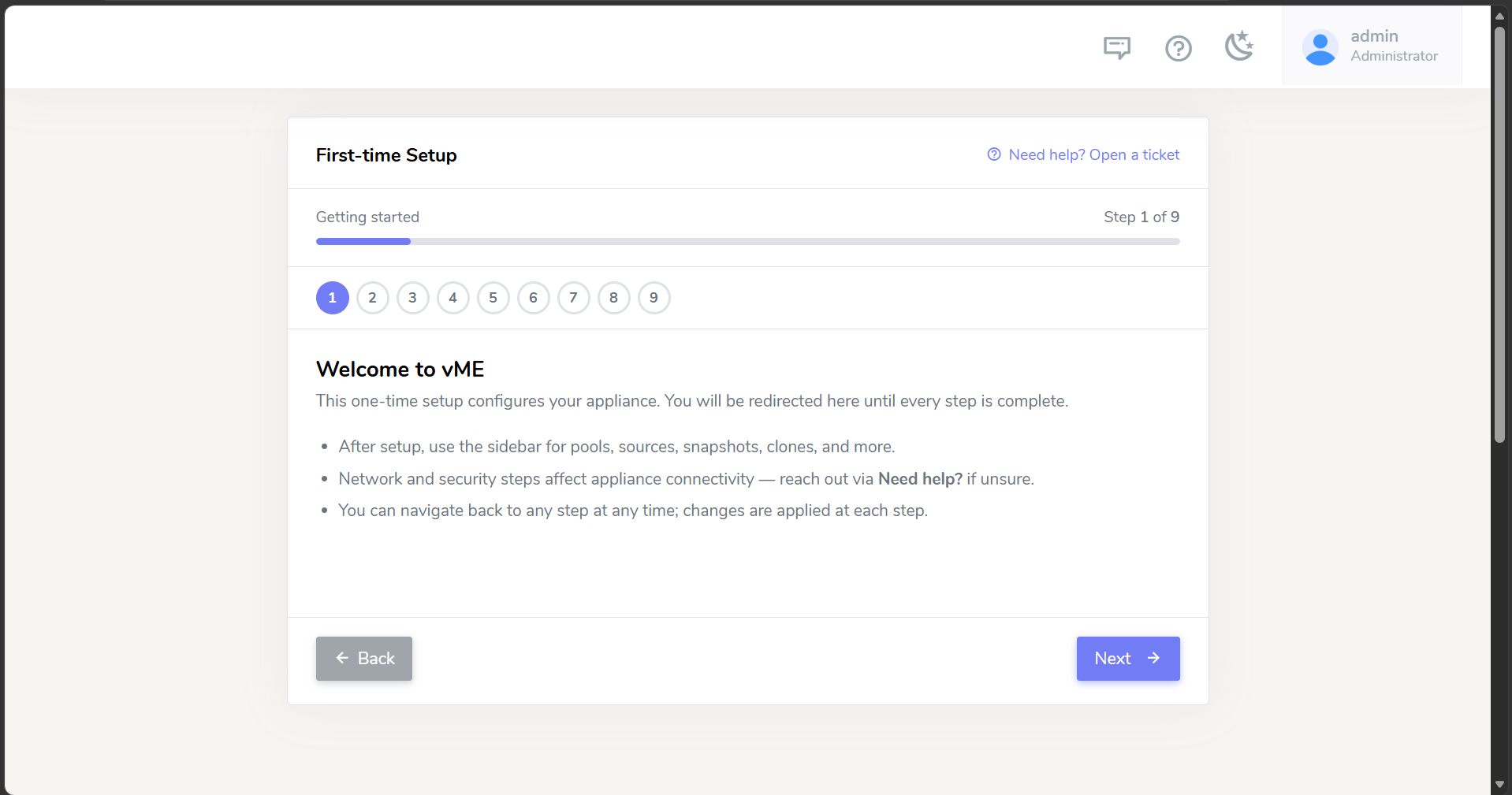
See the Setup Wizard guide for the full step-by-step walkthrough, including DHCP vs static IP networking and installing your own TLS certificate.
End-to-End iSCSI Agent Orchestration
vME can now drive the SQL Server iSCSI workflow remotely and automatically. A lightweight Windows agent (installed from an MSI, run as a background service) enrols each SQL Server host with vME and then picks up and runs onboarding, migration, and clone mount/unmount jobs on demand - with no one logging in to run PowerShell.
Agents are managed centrally from the new Agent Manager in the web console: create one-time enrollment tokens, watch each agent's live status, and rotate keys - all over an outbound-only connection (port 443), so no inbound ports need to be opened on the SQL host.
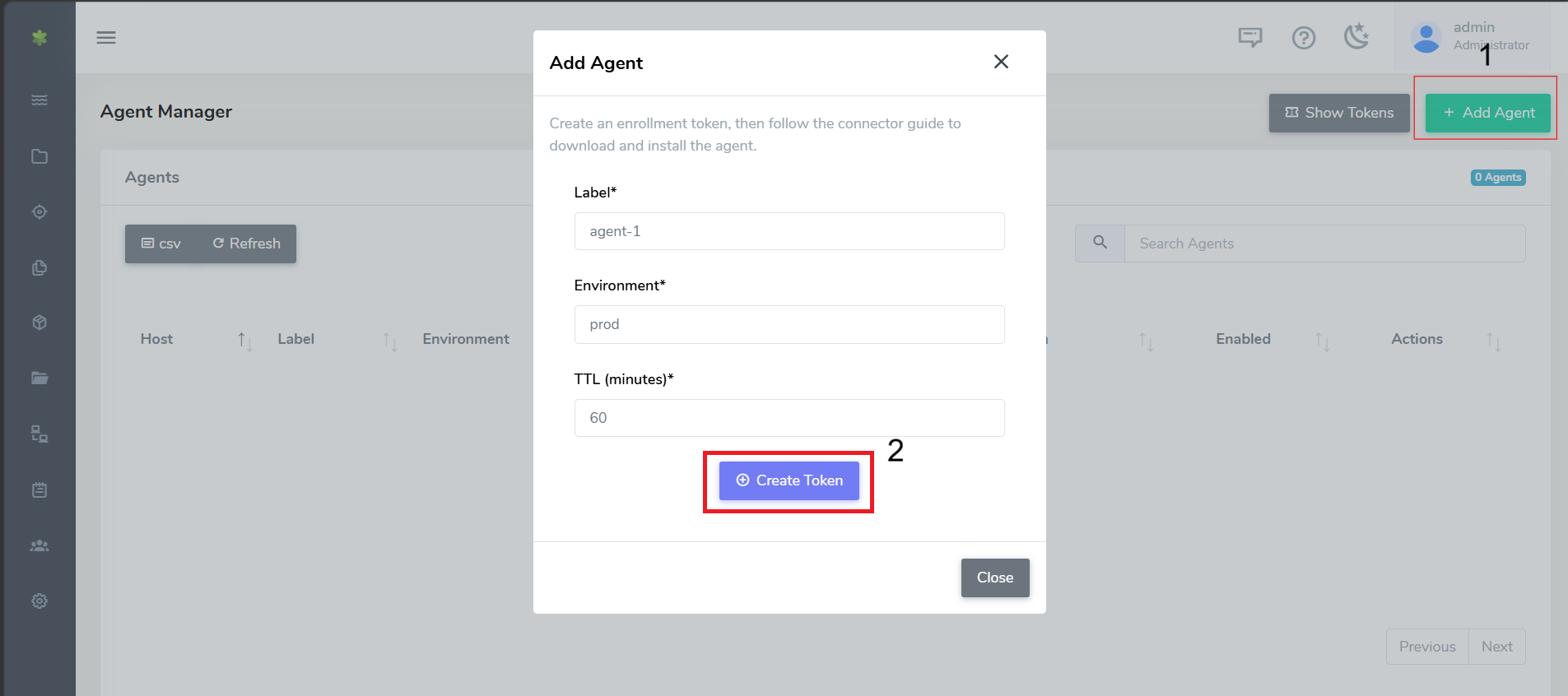
See the iSCSI Connector - Automated (Windows Agent) guide for setup and usage.
Application Onboarding Wizard (Beta)
A new Onboard Application wizard (Beta) guides you through cloning a production database onto another vME appliance end to end - pairing the two appliances, discovering the source host, and driving the iSCSI agent through prep, snapshot, clone, and mount. This is an early Beta; we'd love your feedback.
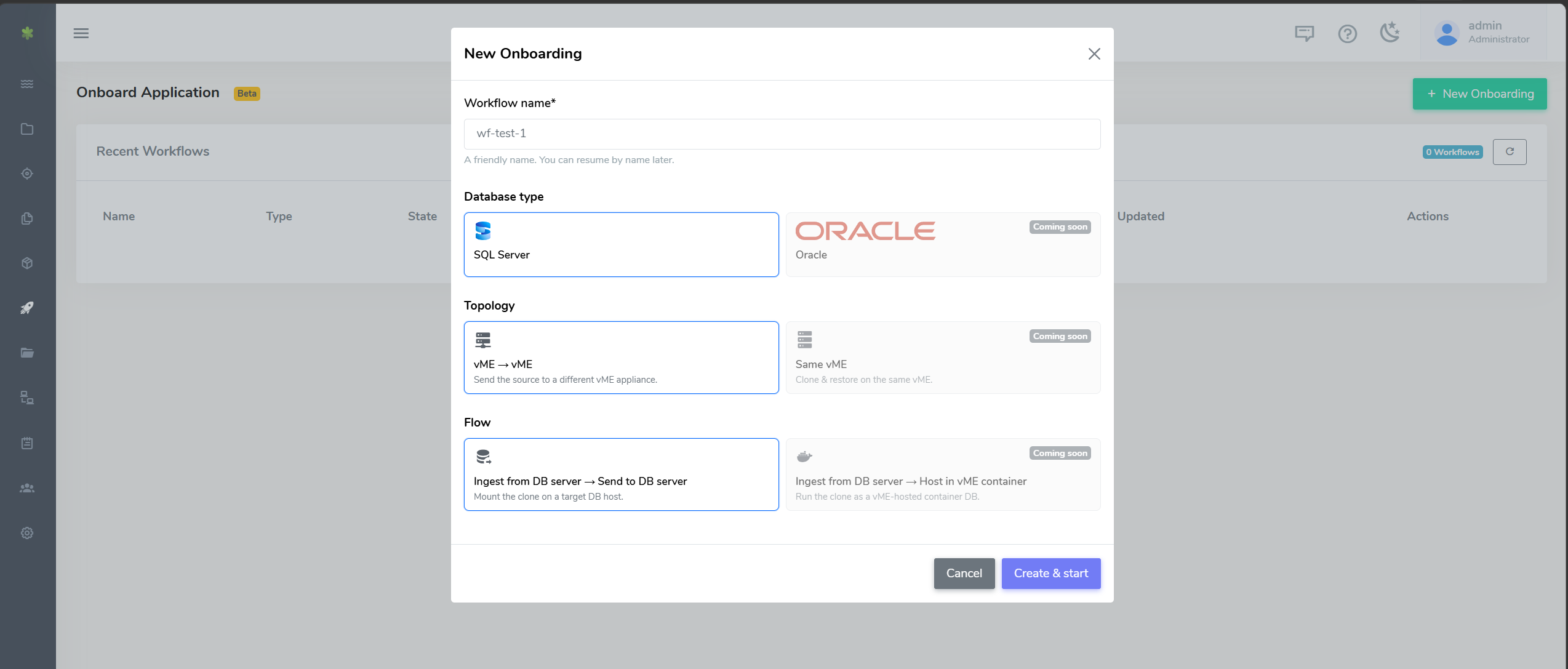
See Onboard Application (Beta) for the full workflow.
Container Connection Details
vME now surfaces each database container's connection details - host, port mappings, mount paths, database type, and environment variables (such as POSTGRES_USER / POSTGRES_PASSWORD) - in the web UI, so you can connect to a running database without hunting for its settings. The container list API (GET /docker/container/list) returns the port mappings, mounts, database type, and environment variables as well.
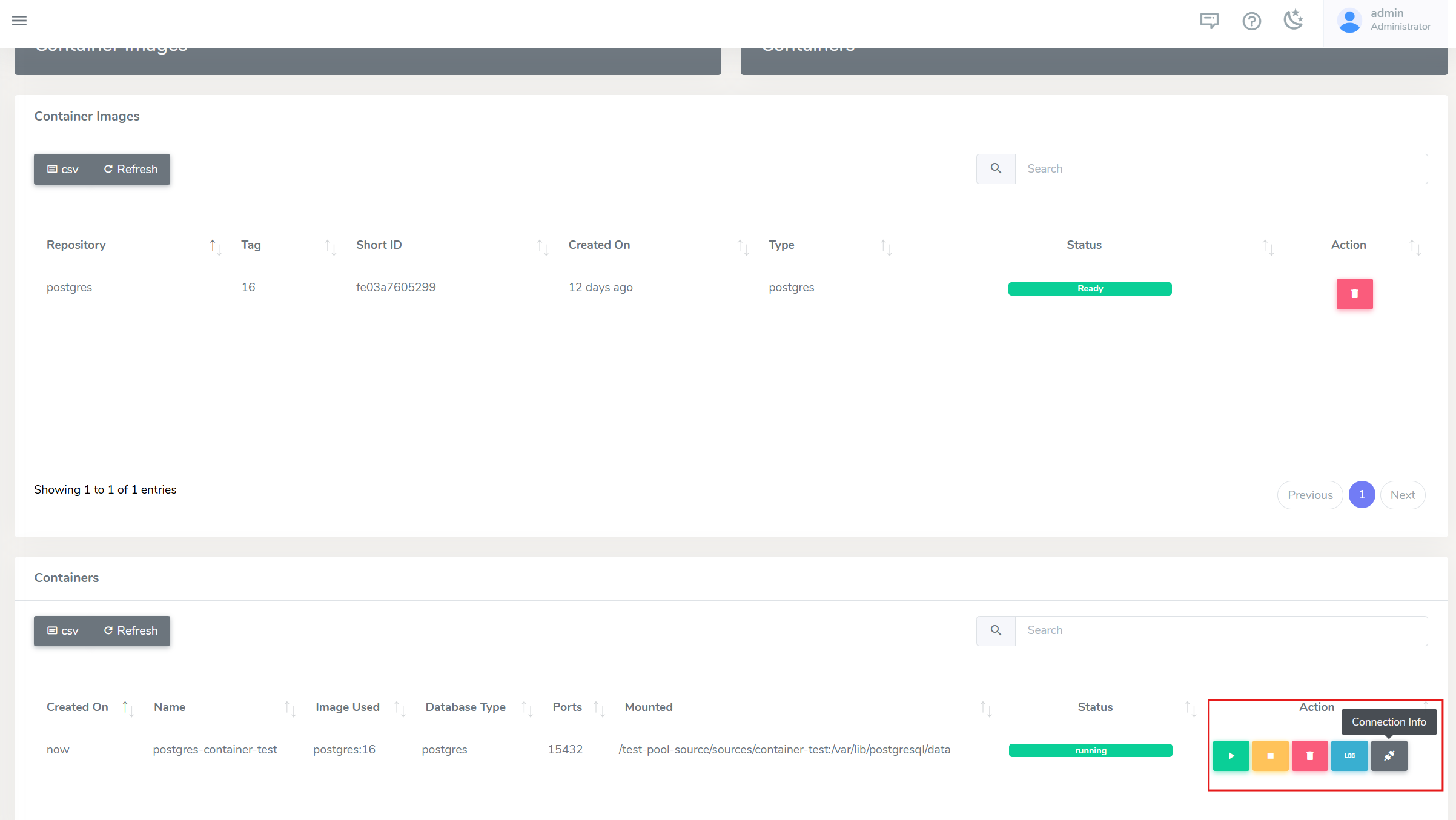
See Getting container connection info for details.
Consistent Snapshots
When you snapshot a source or clone that has running database containers, vME now stops those containers first, takes the snapshot, and restarts them - so the captured data is consistent rather than mid-write. The UI shows a container-aware confirmation listing exactly what will be stopped.
See Snapshots for more info.
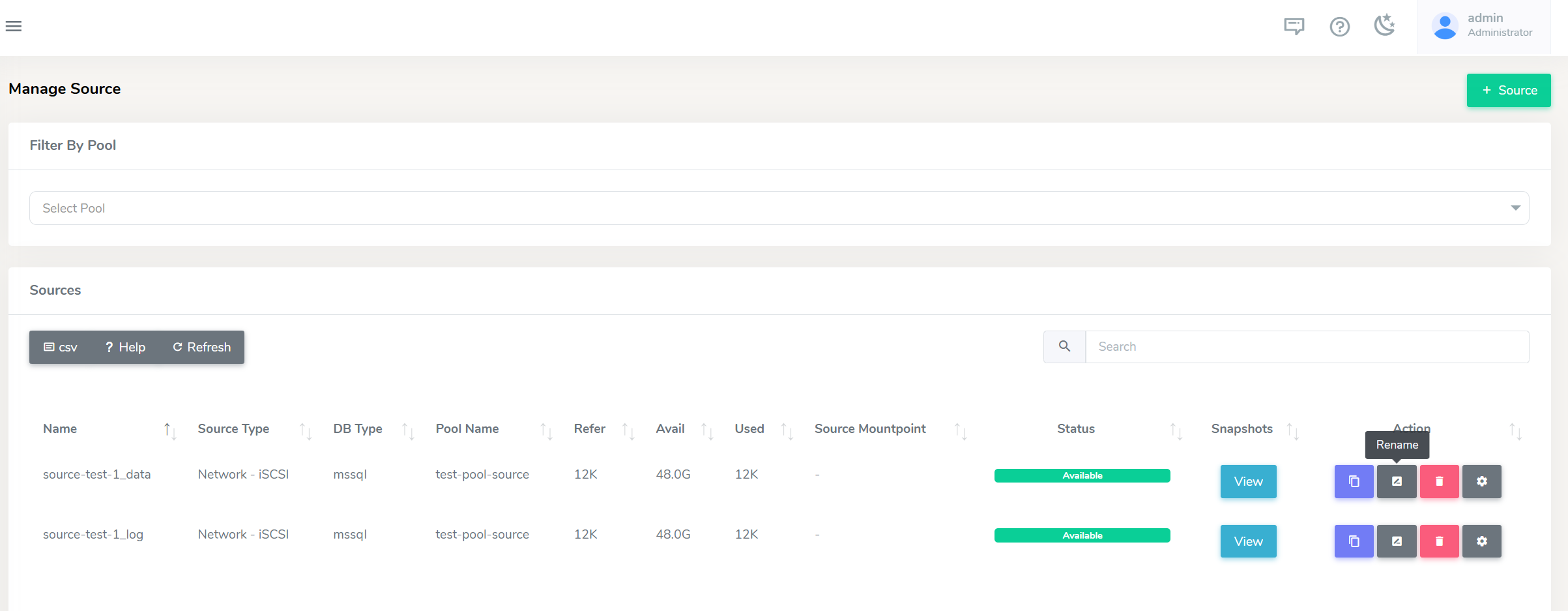
Rename Sources and Clones in the UI
You can now rename sources and clones directly from the web console, instead of destroying and recreating them. (Renaming is not supported for iSCSI sources and clones.)
Unix CLI Install
The vME CLI can now be installed on Unix, in addition to Windows, so you can run it from the command line on either platform. The CLI is also up to date with the 1.9.0 API. See the CLI guide to download and install.
Improvements
- Clearer LDAP errors - a failed LDAP login now shows the actual error returned by the directory, instead of a generic message.
- Licence errors surfaced - operations blocked by an unlicensed or expired appliance now show a clear licence error.
- Longer sessions - the web session timeout has been extended to 24 hours.
Fixed Issues
iSCSI connector
- Snapshots now flush the LUN write cache before the snapshot is taken, so clones are no longer occasionally created RAW/empty.
- Skip-backup no longer crashes when pointed at a single backup file.
Platform
- Login now signs in correctly on the button press after a session timeout.
- Fixed a UI refresh glitch when switching between menu items.
- Fixed cross-appliance API calls failing due to certificate handling.
- Resolved intermittent stale database-connection errors.
API Changes & Upgrading
The 1.9.0 REST API is documented in the vME API reference. A few endpoints changed shape in this release - if you maintain a custom REST integration, review these before upgrading. (The vME web UI and CLI ship updated with the release and need no changes.)
Grab the updated vME Postman collection to get all the new and changed endpoints ready to run - it also includes an Onboarding (API) folder that replicates the full Onboard Application flow as ordered, chained requests.
Breaking changes
POST /user/modifynow requires yourcurrent_password, and a password change is sent as a structured object:- { "username": "jane", "password": "NewPass456!" }
+ {
+ "username": "jane",
+ "current_password": "OldPass123!",
+ "password": { "current": "OldPass123!", "new": "NewPass456!", "confirm": "NewPass456!" }
+ }DELETE /user/deletenow requires yourpasswordand a typed confirmation:- { "username": "ubuntu123" }
+ { "username": "ubuntu123", "password": "MyPassword123!", "confirm_text": "DELETE ubuntu123" }POST /db/receiveis now asynchronous - it returns202 Acceptedwith atask_id. PollGET /tasks/<task_id>for completion instead of expecting a synchronous result.
New and improved
- New endpoints:
POST /db/send/cancel,POST /user/changepass,POST /db/network/create,DELETE /db/network/delete, andGET /tasks/<task_id>. - iSCSI sources & clones over the API:
POST /source/createandPOST /clone/createaccept anetwork_infoblock (type: iscsi, withauto_grow/vsize), and the iSCSI target is provisioned automatically as part of creation. - System-to-system
db sendno longer needs an SSH/PEM key - vME establishes trust with the receiver automatically using its adminapi-key.
1.9.1
Version 1.9.1 is a focused update to the Onboard Application workflow and the iSCSI connector, based on feedback from teams using them day to day.
What's New
Choose Your Own Database Name Prefix
Databases ingested onto iSCSI storage were always named with a fixed ISCSI_ prefix. The ingest step now has a Target database prefix field (under Advanced options) so you can pick a naming scheme that suits your environment. The default remains ISCSI_, already-ingested databases are detected using your chosen prefix, and teardown detaches using the same prefix the workflow ingested with.
Tear Down the Source Host
Once an application has been onboarded and cloned to the target appliance, you can clean up the source SQL host with one click. Tear down source detaches the staging databases, disconnects the workflow's iSCSI sessions, and frees the drive letters on the source host - without touching the source dataset on the appliance, so you can keep cloning from it. Only the workflow's own sessions and databases are affected.
Recognisable Snapshot Names
Snapshots created in the wizard now default to a name derived from your source name (for example SalesDB-20260729103000) instead of the generic prepared-<timestamp>. The name stays fully editable, and invalid characters are rejected with a clear message.
Automatic Drive Letter Assignment
The ingest and clone-mount steps now pick free drive letters automatically instead of defaulting to fixed letters that may already be in use. The pickers prefer the host's recommended letters when free, and never assign the same letter to data and log. Selecting an in-use letter manually still asks for confirmation before reformatting.
Improvements
- P: and S: are now assignable as data/log drive letters across the wizard and the Windows connector.
- Teardown is kinder to shared hosts - a full iSCSI cleanup no longer restarts the Windows iSCSI service, so other iSCSI workloads on the same host are not interrupted, and mount-point cleanup only touches the drive letters the workflow owns.
Fixed Issues
Onboard Application
- Workflow steps completed directly via the REST API (for example with the Postman collection) are now recorded on the workflow and shown on the wizard's stepper, which refreshes live - previously the stepper only updated for actions taken inside the wizard itself.
iSCSI Connector
- Tearing down a clone could leave the iSCSI session reconnecting automatically: persistent target registrations are now parsed and removed correctly, so a torn-down target stays disconnected.
- Sessions are now disconnected reliably even when the target is no longer in the discovered-targets list.
- Disks are taken offline before their session is disconnected, so volumes dismount cleanly during teardown.
- The teardown's database-detach step can be skipped cleanly when there is nothing to detach, instead of stalling the run.
API Changes & Upgrading
Update the Windows connector to use the new features. The custom database prefix and the teardown fixes live in the Windows iSCSI connector - update the connector (MSI) on your SQL Server hosts as part of this upgrade. Until a host's connector is updated, ingests on that host keep the default ISCSI_ prefix regardless of what is set in the wizard.
Behaviour change for direct connector use: in the teardown script, the disconnect selection now takes Windows disk numbers (as shown in the script's disk listing) instead of session list positions. ALL and MATCH selections are unchanged, and wizard-driven teardowns are unaffected.
API additions (all optional, backwards compatible):
- The ingest and teardown jobs accept a
dbPrefixvalue (migrate.dbPrefix/unmount.dbPrefix). - The snapshot, clone, source, and send APIs accept optional workflow tracking fields (
workflow_id,wizard_step,role) so API-driven onboarding steps appear on the wizard's stepper. - The vME Postman collection's Onboarding (API) folder has been updated to use these fields.
1.9.2
Version 1.9.2 continues the Onboard Application and iSCSI connector work.
What's New
Choose Which Databases To Restore From Your Backups
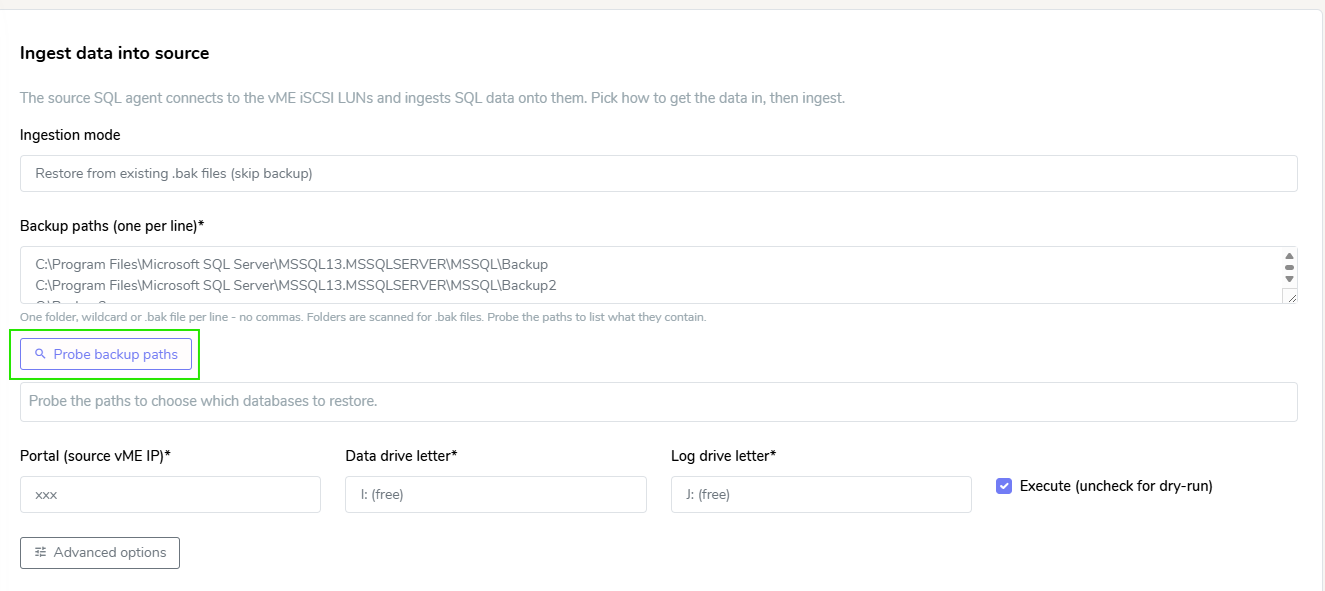
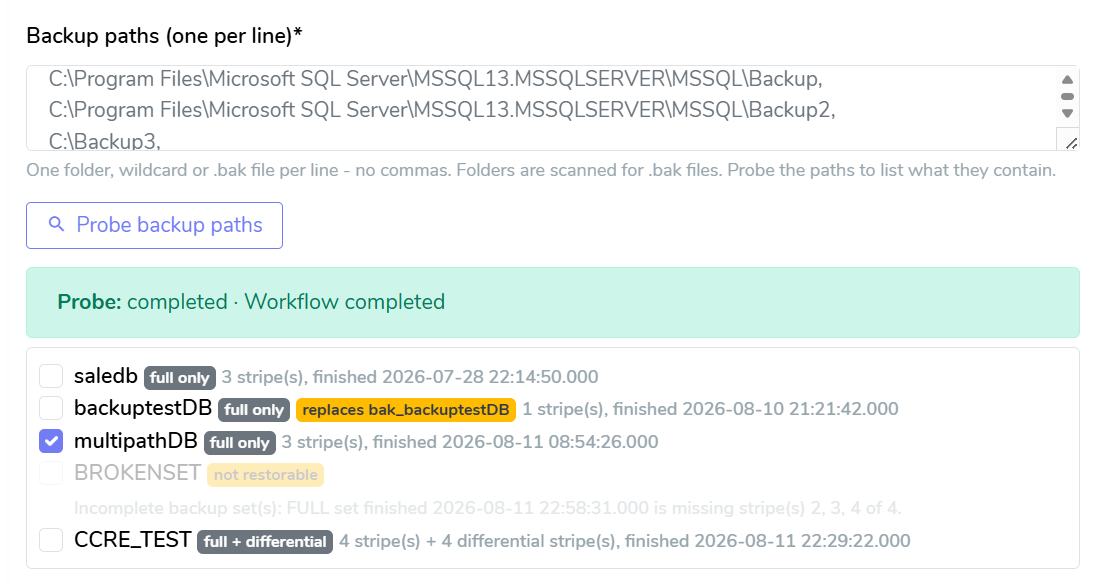
The ingest step can now probe backup paths: every database found is listed with its backup set (stripes, differential, backup time) and you tick the ones to ingest. Sets that cannot be restored are marked with the reason, and a name that already exists on the host is flagged as a replacement. A probe reads backup headers only, so it can run before the iSCSI drives are prepared.
Ingest From Full Plus Differential Backups
A striped full plus its newest differential now restores as one backup set, and stripes may span several backup paths. An incomplete set stops the run naming the files it found.
Choose the Source SQL Instance
An optional SQL instance field on the ingest step pins the source instance on hosts running more than one. Teardown targets the instance the ingest used.
Database State in Discovery
Host discovery reports each database's state, and a database that cannot be read cannot be selected as a source.
Improvements
- Ingest jobs are no longer limited to one hour, and restore progress appears in the job log as it runs.
- Drive letter suggestions are simply the first two free letters.
- Backup paths are entered one per line; a trailing comma or semicolon is ignored.
- A step whose agent stops reporting shows in amber as stopped reporting instead of running forever. An agent that comes back still reports the real outcome.
Fixed Issues
Onboard Application
- Deleting a workflow with cleanup now detaches the staging databases on the source SQL host before destroying the source dataset, instead of leaving them unreadable on the instance.
- A delete that reports itself as still in progress can simply be run again and completes the cleanup.
- A clone attached with a custom database prefix no longer gains an extra
ISCSI_on top; clones attach under the name the ingest created. - The setup wizard rejects invalid hostnames, and the NTP field accepts IPv4-mapped IPv6 addresses.
iSCSI Connector
- A workflow could prepare, format or reclaim drive letters from another workflow's disks when one source name was a prefix of another. Workflows now match their own disks exactly and stop rather than touch a disk they cannot confirm as their own.
- Clones no longer attach with a doubled name such as
ISCSI_Sales_Sales. Existing doubled names can be renamed withALTER DATABASE ... MODIFY NAME, a metadata-only change. - The attach honours the configured database prefix instead of always applying
ISCSI_.
API Changes & Upgrading
Update the Windows connector (MSI) on your SQL Server hosts. Everything above except the wizard changes lives in the connector. In particular, ingesting from existing backup files requires the updated connector: on an older one the probe reports a configuration error and the ingest cannot start. Other ingest modes keep their previous behaviour until a host is updated.
If you used a custom database prefix in 1.9.1: clones mounted before this upgrade may carry a doubled name the teardown will not match. Detach them on the host or rename them with ALTER DATABASE ... MODIFY NAME first.
API additions (all optional, backwards compatible):
migrate.probeOnlyreports the backup sets inmigrate.backupPaths(asbackupSetsin the job result) without restoring; drive letters are not required. Pass the reported files back asbackupPathsto restore a subset.migrate.sqlInstancepins the source SQL instance.attach.dbPrefixapplies the wizard's prefix to an API-driven attach.job_timeout_secondsoverrides a job's default timeout (24 hours for an ingest, one hour otherwise).- Host discovery includes each database's
state. - Agent jobs can report a non-terminal
timed_outstate when the host's agent stops reporting; a returning agent can still move the job tocompletedorfailed. - The vME Postman collection carries a version so it can be matched to a release.
Behaviour note for direct connector use: the clone attach derives each database's name from its primary data file rather than the file name.
1.9.3
Version 1.9.3 adds wrong-instance protection for ingest and rounds out driving the Onboard Application through the API.
What's New
Wrong-Instance Protection for Ingest
On hosts running more than one SQL instance, database ids repeat across instances. The wizard now records which instance your databases were selected on and blocks a selection that spans instances, and the connector stops an ingest before anything is backed up or restored when the job resolves to a different instance than the selection was made on. Runs without an explicit database selection are unaffected.
Improvements
- Portal addresses on the discovery, ingest, and mount steps are validated when you submit: a mistyped address is rejected immediately with a message instead of queuing a job that fails later on the host.
- A failed agent job now fails its workflow: the failed step is named on the final page, and Mark complete asks for explicit confirmation while a step has failed.
Fixed Issues
Onboard Application
- Workflow steps completed through the API (for example with the vME Postman collection) now record the same details the wizard records, so the wizard renders API-driven workflows correctly.
- Resume source provisioning and Re-apply iSCSI settings now succeed on a partially or fully provisioned source.
- Two sends started at the same time no longer conflict during first-time transfer setup.
API Changes & Upgrading
API additions and behaviour (backwards compatible):
/db/network/createon a dataset that already has its network settings returns success with "Network already configured" instead of an error.migrate.selectionInstanceon an ingest job names the instance a database selection was made against; the job aborts before restoring when it resolves to a different instance. Omit it to keep the previous behaviour.receiver.ssh_addresson/db/sendsets the data-transfer host when it differs from the target's API address (for example a private address between appliances).
Update the Windows connector (MSI) to 1.3.3 on your SQL Server hosts to get the wrong-instance protection; other changes live on the appliance.